38
Main Pages
Routes Menu Page
Editing a Route
You can edit many elements of a route, such as the route name and the route order. You
can add waypoints at any point along the route. You can also remove waypoints from the
route. To edit a route, highlight the desired route from the Route List and press ENTER to
display the Route Page.
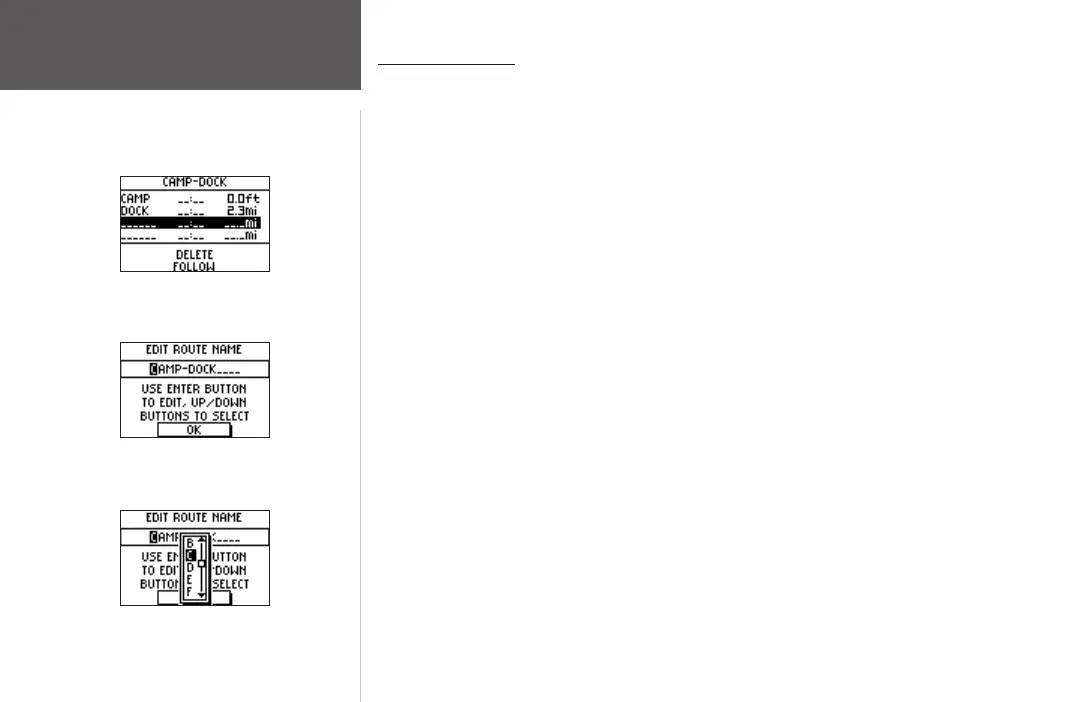
To edit the route name:
1. With the Route Page open, highlight the route name and press ENTER.
2. With the desired letter highlighted, press
ENTER to begin entering a new name in the
Edit Route Name Page.
3. Use the
UP and DOWN buttons to select the desired character from the scrolling list.
Press ENTER when the desired character is highlighted.
4. Repeat steps 3 and 4 until the desired route name is entered.
5. Use the
UP and DOWN buttons to highlight ‘OK’ and press ENTER. The new route
name is then displayed at the top of the Route Page.
Route Page
Edit Route Name
Editing the Route Name













 To Next Page