City Forecasts
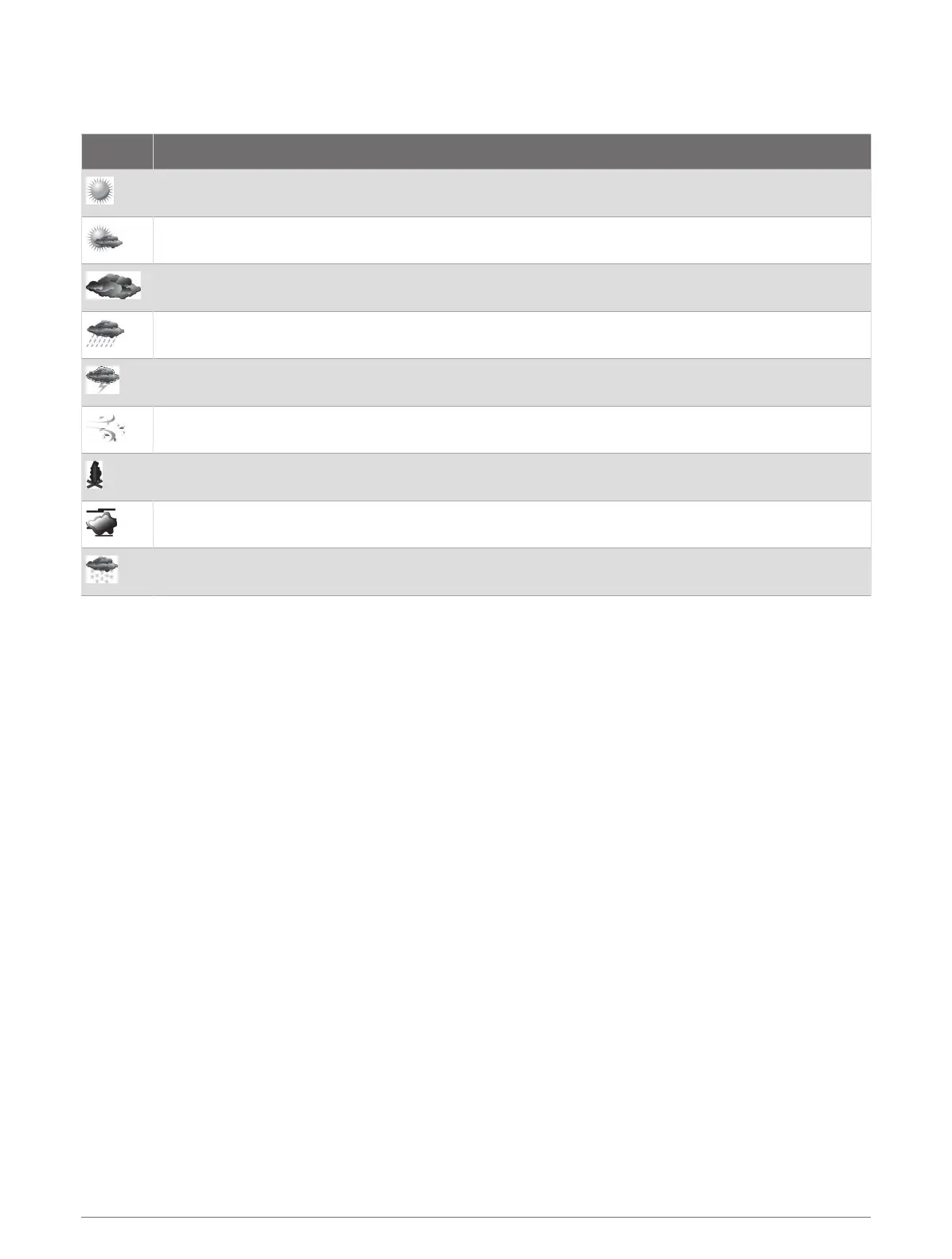
City forecasts appear as weather symbols. The forecast is viewed in 12-hour increments.
Symbol Weather
Fair (sunny, hot, clear)
Partly cloudy
Cloudy
Rain (drizzle, sleet, showers)
Thunderstorms
Windy
Smoke (dusty, hazy)
Foggy
Snow (snow showers, flurries, blizzard, blowing snow, sleet, freezing rain, freezing drizzle)
Viewing Fish Mapping Data
NOTE: This feature requires a GXM 54 antenna and a SiriusXM Fish Mapping
™
service subscription.
The Fish Mapping weather chart shows information that can help you locate fish species.
1 Select Charts > Fish Mapping.
2 If necessary, select Options > Layers, and turn on and off information.
Viewing Sea Conditions
The Sea Conditions feature shows information about surface conditions, including winds, wave height, wave
period, and wave direction.
Select Charts > Sea Conditions.
152 SiriusXM Weather













 To Next Page