Reference
12
Map Page Setup Options
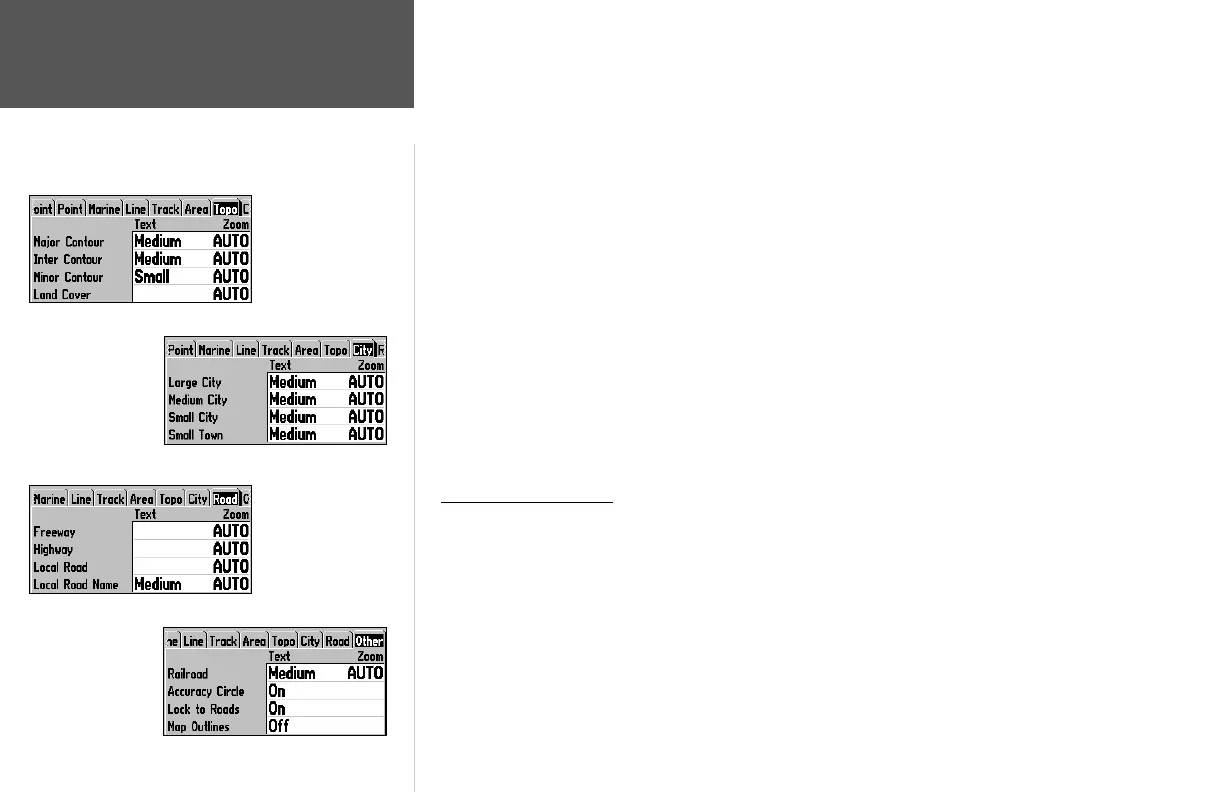
City Tab— Large City, Medium City, Small City, Small Town
Text— Off, Small, Medium, and Large: controls the screen size of the name.
Zoom— Auto, Off, 20 ft.-800 mi.: sets the maximum scale at which the cities appear on the screen.
Some types of data will only be displayed at certain zoom scales.
Road Tab— Freeway, Highway, Local Road, Local Road Name
Text— Off, Small, Medium, and Large: controls the screen size of the name.
Zoom— Auto, Off, 20 ft.-800 mi.: sets the maximum scale at which the roads appear on the screen.
Some types of data will only be displayed at certain zoom scales.
Other Tab
Railroad— Auto, Off, 120 ft.-800 mi.: sets the maximum scale at which railroads appear on the screen.
Accuracy Circle— On/Off: toggles the circle ‘On’ and ‘Off’. The circle represents the approximate accu-
racy of the unit based on EPE, DOP, and basemap quality. You position will be within the circle.
Lock to Roads— On/Off: This feature is only available if MapSource MetroGuide or City Navigator
data is loaded. When the feature is active, the triangle icon will lock to the road that you are traveling.
Map Outlines— On/Off: toggles the coverage boxes for BlueChart/MapSource data ‘On’ and ‘Off’.
Setup Map Menu Options
From the Map Setup page (Map tab of the Main Menu), the following options are available by
pressing the MENU key:
• Defaults
• All Map Defaults
• Data Card Information
To restore defaults for map settings:
1. From the Map setup page, highlight the desired tab or setup feature you want to restore settings to
and press MENU.
2. Highlight ‘Defaults’ (highlight ‘All Map Defaults’ if you want all tabs restored) and press ENTER.
City Tab
Topo Tab
Road Tab
Other Tab
190-00185-10_0A.indd 12 6/18/2002, 10:00:20 AM














 To Next Page