Reference
49
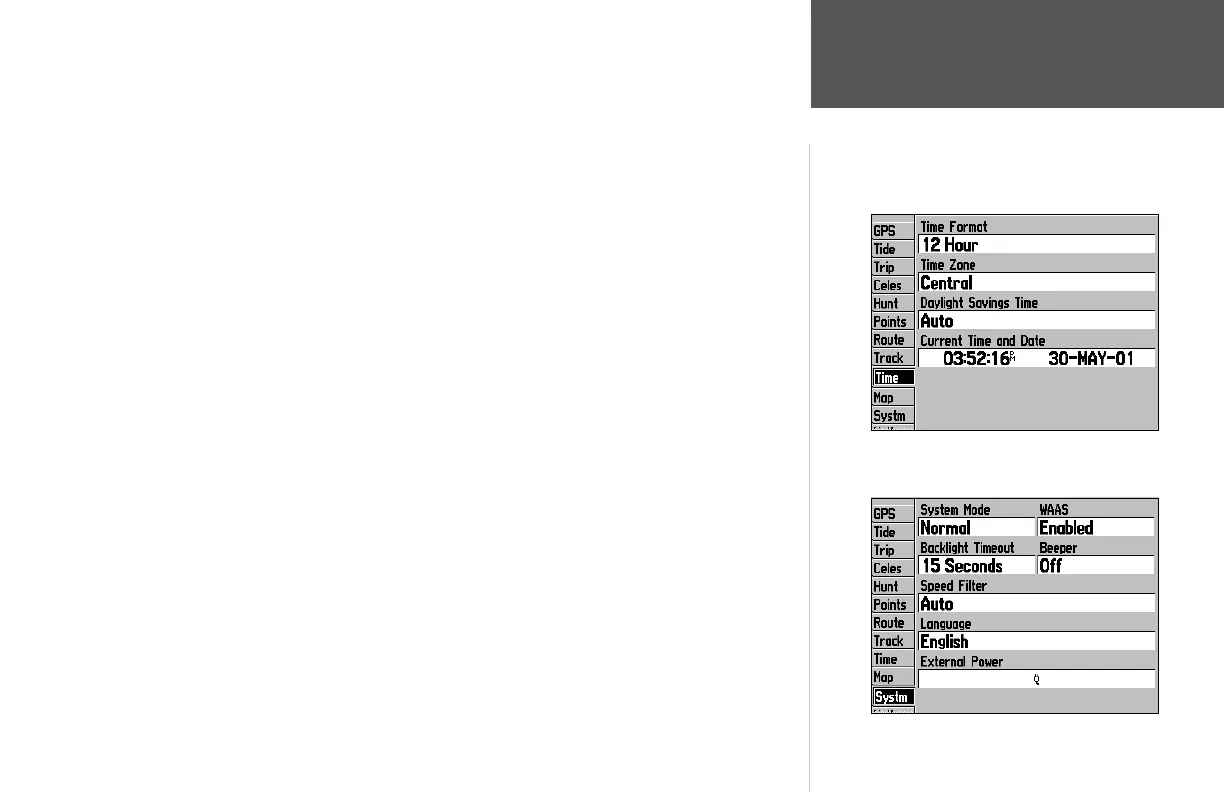
Time Tab— displays the current time and date, allows you to adjust the 12 or 24 hour time format,
enter a time zone and adjust for daylight savings to show correct local time.
The following menu options are available:
• Time Format— choose from 12 or 24 hour (military) time format.
• Time Zone- choose your correct time zone to show correct local time or enter a UTC Offset. The UTC
(also called Greenwich Time) offset is how many hours you are ahead or behind the time line. See the
table on page 59 for time offsets.
• Daylight Savings— choose from ‘Auto’, ‘On’, or ‘Off’ to adjust for daylight savings.
Map Tab— Contains setup options for the Map Page. For detailed information on the Map Tab, see
pages 18-21.
System (Systm) Tab— controls system settings for the system mode, WAAS, backlight timeout,
beeper, speed fi lter, languages, and current power status (external power or battery scale).
The following settings are available:
• System Mode— select from ‘Normal’ (Normal Navigation) or ‘Simulator’ (For practice ONLY).
• WAAS—enable/disable the search for WAAS satellites.
• Beeper— controls audible beep. Select from ‘Off’, ‘Alarms Only’ (sounds for alarms/messages), ‘Key
and Alarm’ (sounds for key presses and alarms/messages).
• Backlight Timeout—setting are ‘Stays On’, ‘15 Seconds’, ‘30 Seconds’, ‘1 Minute’, or ‘2 Minutes’.
• Speed Filter— averages speed-readings. Choose from ‘Off’, ‘Auto’ (automatically controls fi ltering), or
‘On’ (allows you to enter a value from 1 to 255 seconds).
• Language— select from various languages for the unit’s on-screen display.
• Power Source— either displays battery power (battery level indicator) or shows that an external power
source is in use (electrical plug).
Main Menu:
Time/Map/System Tabs
Time Tab
System Tab
190-00185-10_0A.indd 49 6/18/2002, 10:01:00 AM














 To Next Page