Whiteline
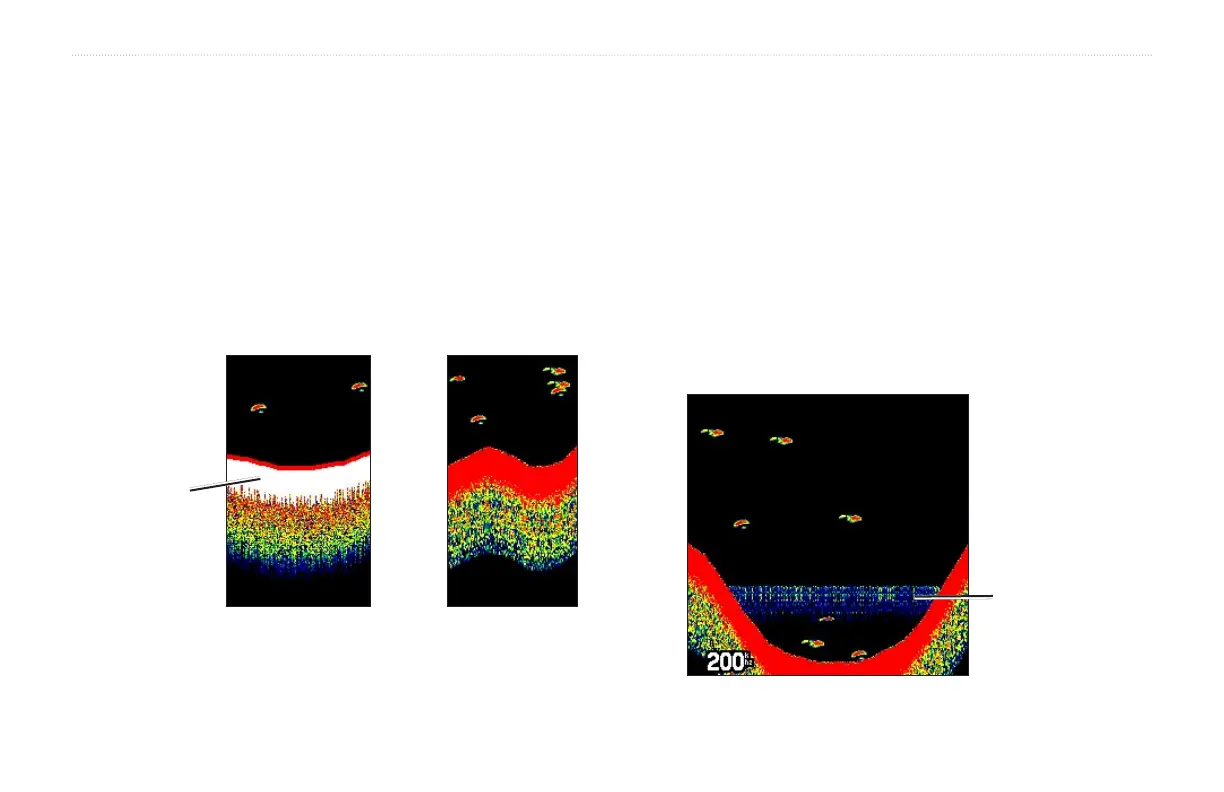
The GSD 20 Sounder Module can help you determine whether the
bottom is hard or soft. When the sonar sound waves are reflected
back by the bottom, a hard bottom returns a stronger signal than a
soft bottom. A thin whiteline indicates a softer bottom, while a thick
whiteline indicates a harder bottom. Normally, a red line is used
to show the point where water meets the bottom. This line follows
the bottom contour, along with any significant objects lying on the
bottom. The unit uses the whiteline function to make the bottom
layer information easier to distinguish.
Whiteline OffWhiteline On
Thick
Whiteline:
Hard bottom
Thermoclines
A rough definition of a thermocline is a break in water where
the water temperature changes faster than the water above it.
Thermoclines are shown as the weakest colors.
One of the unique features offered by Garmin is See-Thru
®
technology, which allows the GPSMAP 276C to hear both weak and
strong signals simultaneously so it can identify fish returns under
the toughest conditions, such as suspended in thermoclines or even
hiding near structures. See-Thru technology allows the GSD 20
Sounder Module to “see” through thermoclines and helps locate fish
where they live—and fish love thermoclines!
Thermocline
GPSMAP 276C Owner’s Manual 101
SETTING UP AND USING SONAR > UNDERSTANDING SONAR













 To Next Page