Creating and Using Waypoints
The GPSMAP 278 stores up to 3,000 alphanumeric waypoints with
a user-defined icon, comment, elevation, depth, and temperature
available for each waypoint. You can create waypoints using three
basic methods:
• ENTER/MARK—use the ENTER/MARK key to mark your
present location.
• Graphically—use the map display to define a new waypoint
location.
• Manually—enter waypoint location coordinates manually.
Marking Your Present Location
Use the ENTER/MARK key to capture your present location to
create a new waypoint. You must have a valid position (2D or 3D)
fix to mark your present location.
To mark your present location:
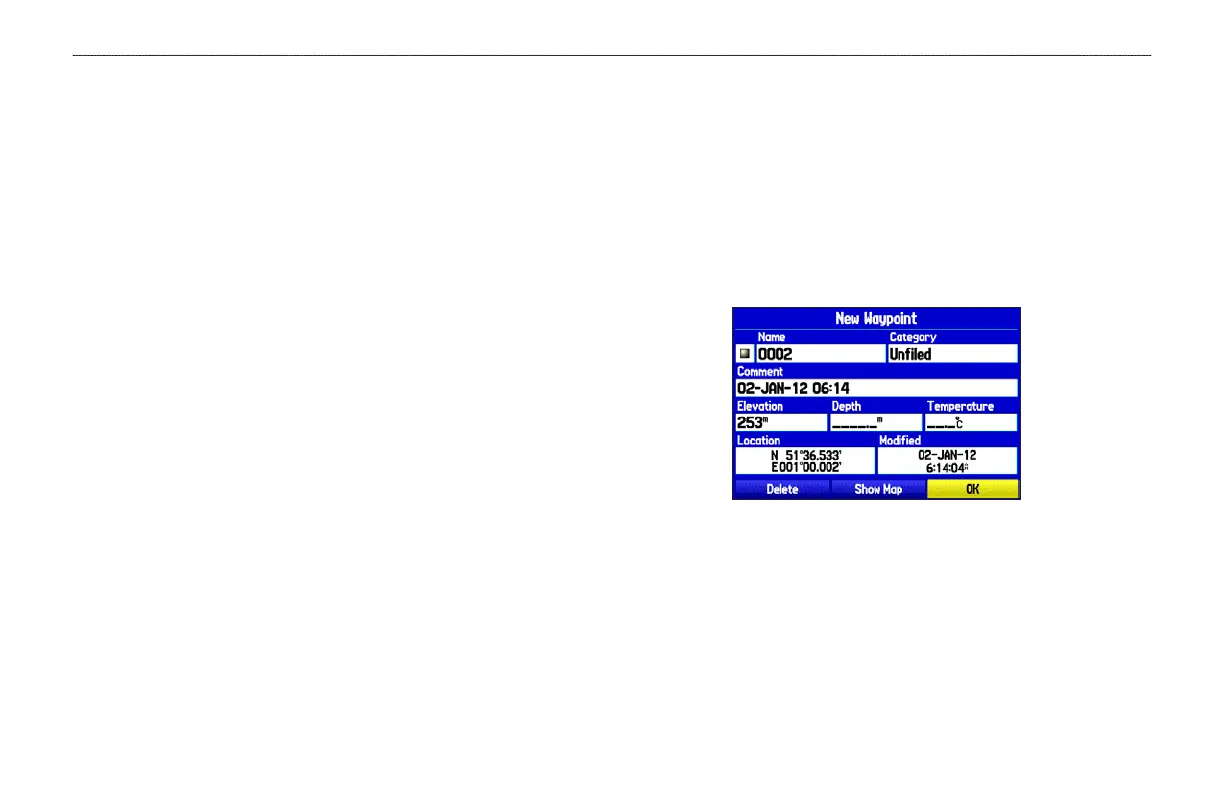
1. Press and hold the ENTER/MARK key until the New
Waypoint Page appears, then release it. A default four-digit
name and symbol are assigned for the new waypoint.
New Waypoint Page
2. To accept the waypoint with the default information, highlight
OK, and press ENTER.
To change any information on the New Waypoint Page,
highlight the appropriate field and press ENTER. After
entering and confirming your changes, highlight OK, and
press ENTER.
28 GPSMAP 278 Owner’s Manual
MARINE MODE > CREATING AND USING WAYPOINTS













 To Next Page