Adjusting the Backlight
1 Select to open the status page.
2 Use and to adjust the brightness.
TIP: You can select NV to reduce the backlight intensity for compatibility with night vision goggles.
Charging the Device
NOTICE
To prevent corrosion, thoroughly dry the USB port, the weather cap, and the surrounding area before charging or
connecting to a computer.
Do not charge the device using the USB port in wet conditions. For all-weather charging, use the optional spine
mount accessory (buy.garmin.com).
NOTE: The device does not charge when it is outside the approved temperature range (Specifications,
page 45).
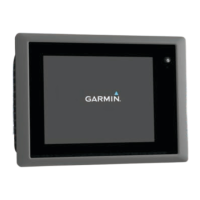
1 Lift the weather cap .
2 Plug the small end of the power cable into the charging port on the device.
3 Plug the other end of the power cable into a compatible AC power adapter.
4 Plug the AC power adapter into a standard wall outlet.
5 Charge the device completely.
Saving Energy While Charging the Device
1 Connect your device to an external power source.
2 Hold the power button until the screen turns off.
The device goes into a low power, battery charging mode, and the battery gauge appears.
3 Charge the device completely.
4 Introduction




 To Next Page