96
Main Menu
Interface
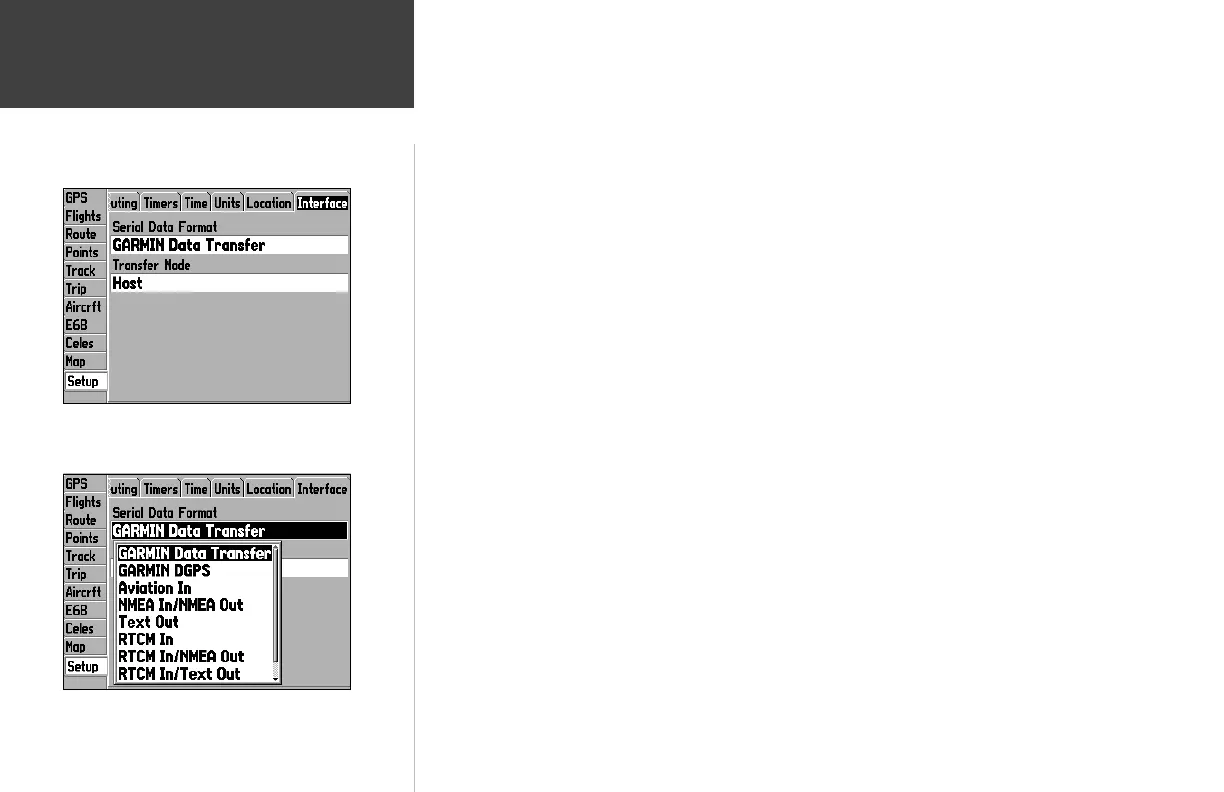
Serial Data Format— lets you control the input/output format used when connecting your GPSMAP
196 to external NMEA devices, a DGPS beacon receiver, a personal computer, etc. If a DGPS receiver
is used, WAAS capability will automatically be turned ‘Off’. The following formats are available:
• Garmin Data Transfer— the proprietary format used to upload/download MapSource data, exchange
waypoint, route, track, fl ights, almanac, and proximity data with a PC or another Garmin GPSMAP
196. When you select ‘Garmin Data Transfer’, there are 11 Transfer Modes to choose from: Host,
Request Almanac, Request Proximity, Request Routes, Request Tracks, Request Waypoints, Send Alma-
nac, Send Proximity, Send Routes, Send Tracks and Send Waypoints.
• Garmin DGPS— used to connect the GPSMAP 196 with a Garmin DGPS beacon receiver.
• Aviation In— the proprietary format used for connection to a Garmin panel-mounted GPS receiver.
Allows Goto or route selection on the panel-mounted GPS receiver to be automatically displayed on
the GPSMAP 196. This eliminates the need to enter the destination on both units.
• NMEA In/NMEA Out— supports the input/output of standard NMEA 0183 version 2.3 data, and
sonar NMEA input support for the DPT, MTW and VHW sentences.
• Text Out— allows the unit to output simple text data that includes, data, time, position and velocity.
The Baud can be set to 1200, 2400, 4800, or 9600bps.
• RTCM In— allows Differential GPS (DGPS) input using a standard RTCM format.
• RTCM In/NMEA Out— allows Differential GPS (DGPS) input using a standard RTCM format and also
provides NMEA 0183 version 2.3 output.
• RTCM In/Text Out— allows Differential GPS (DGPS) input using a standard RTCM format and also
outputs simple text data that includes, data, time, positoin and velocity.
• None— provides no interfacing capabilities.
The Interface screen lets you select the various input/output
settings.
Setup Tab: Interface
Select ‘Garmin Data Transfer’ for database updates and for use
with MapSource software products.
190-00283-00Backup.indd 96 12/8/2002, 8:09:47 PM














 To Next Page