52
NRST/FIND
Nearest FSS or ARTCC
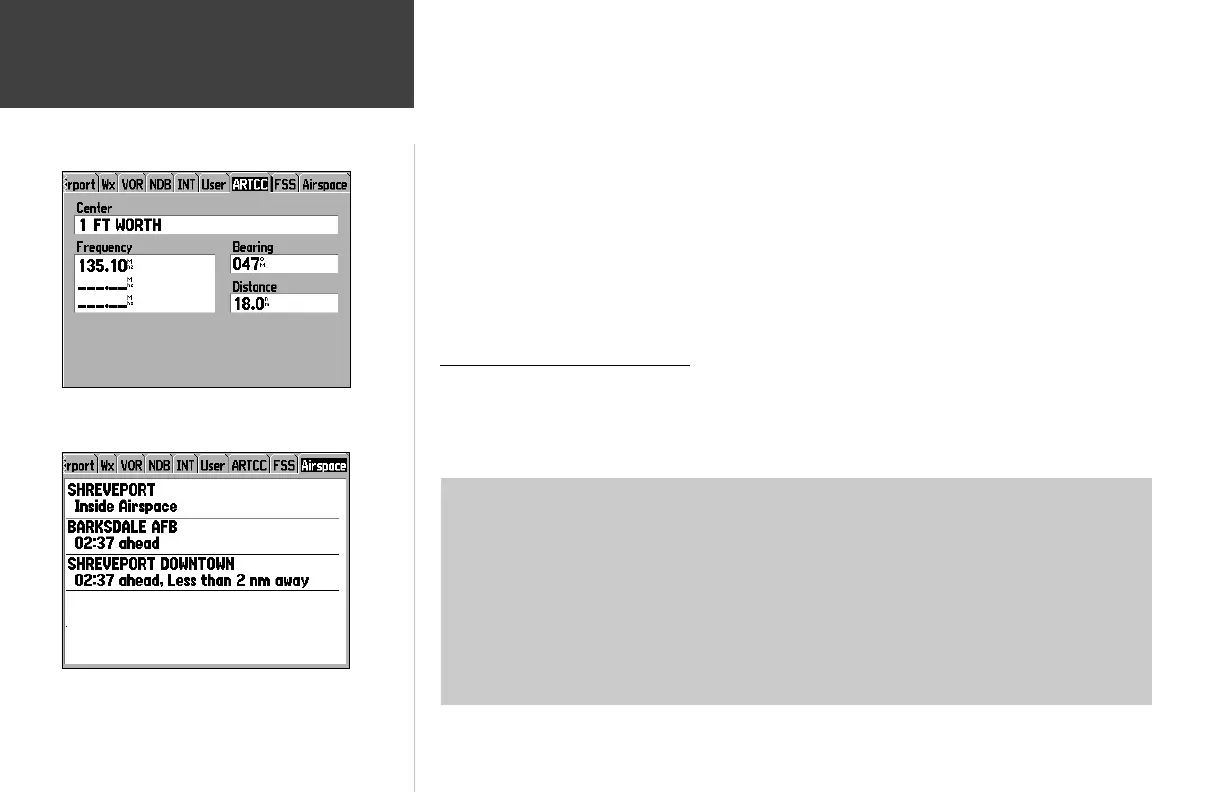
The Nearest Pages list up to fi ve nearest fl ight service station (FSS) and air route traffi c control
center (ARTCC) points of communication. The closest communication point—along with frequency(s),
bearing to and distance—is displayed fi rst, with additional points available when selected. For duplex
operation, the corresponding VOR is listed (by identifi er) and the transmit and receive frequencies are
denoted by a ‘TX’ and ‘RX’ respectively.
To view additional communication frequencies:
1. Display the Nearest Pages by following the steps on page 50.
2. Use the ARROW KEYPAD to select the ‘ARTCC’ or ‘FSS’ fi le tab, as desired.
3. Use the DOWN portion of the ARROW KEYPAD to highlight the ‘CENTER’ or ‘STATION’ fi eld
(depending upon selection of ‘ARTCC’ or ‘FSS’ tab) and press ENTER.
4. Select the desired numbered item from the list and press ENTER to display the communication infor-
mation. (The lowest numbers on the list are the closest communication points.)
Nearest Airspace Information
When an airspace alert is provided, pressing the NRST key automatically displays nearby airspace
information. This information includes name, time to entry (if applicable) and status. Normally, only
one or two airspace alerts will occur at a time, but with sectorized controlled airspace (such as many
Class B areas) you may have more.
Status information can appear as follows:
• Ahead—your projected course will take you inside an airspace within the next ten minutes or
less.
• Near—you are within two nautical miles of an airspace, but not projected to enter it.
• Near & Ahead—you are within two nautical miles of an airspace and your current course will
take you inside the airspace.
• Inside Airspace—you are within the boundaries of the airspace.
The ‘ARTCC’ tab displays the frequencies and usage restrictions for
up to fi ve nearest air traffi c control center points of commnication.
When airspace alerts occur, press NRST and select the ‘Airspace’
tab to view additional information.
190-00283-00Backup.indd 52 12/8/2002, 8:09:18 PM













 To Next Page