MapSource User’s Manual 17
USING MAPSOURCE > CREATING AND EDITING WAYPOINTS
Creating and Editing Waypoints
A waypoint is any point on the Graphic Map that you
store in memory. You can easily create waypoints in
MapSource and then transfer them to your GPS unit.
You can also load waypoints from your GPS unit into
MapSource and then edit them. To send and receive
information from your GPS unit, see page 13.
Creating Waypoints
When you create a waypoint, MapSource automatically
names the waypoint based on its location. If you create
a waypoint on an existing map feature, MapSource
bases the waypoint name on the feature. If you create
a waypoint on an open location, MapSource names the
waypoint with a number. Each waypoint you create
appears in the Waypoints tab on the left side of
the window.
To create a waypoint:
1. Click the Waypoint tool or click Tools >
Waypoint.
2. Locate the place and then click anywhere on
the Graphic Map to create a waypoint at that
exact spot. To create a waypoint in the center
of the Graphic Map, press Ctrl + W on your
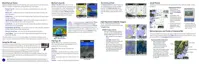
keyboard. The Waypoint Properties dialog box
appears.
Waypoint Properties dialog box
3. Make changes to the waypoint properties
as necessary. Click More Details to view all
available waypoint properties.
4. Click OK to save the waypoint. Click Cancel to
exit without creating the waypoint.



 To Next Page