2 MapSource User’s Manual
INSTALLING MAPSOURCE > UNLOCKING MAPS
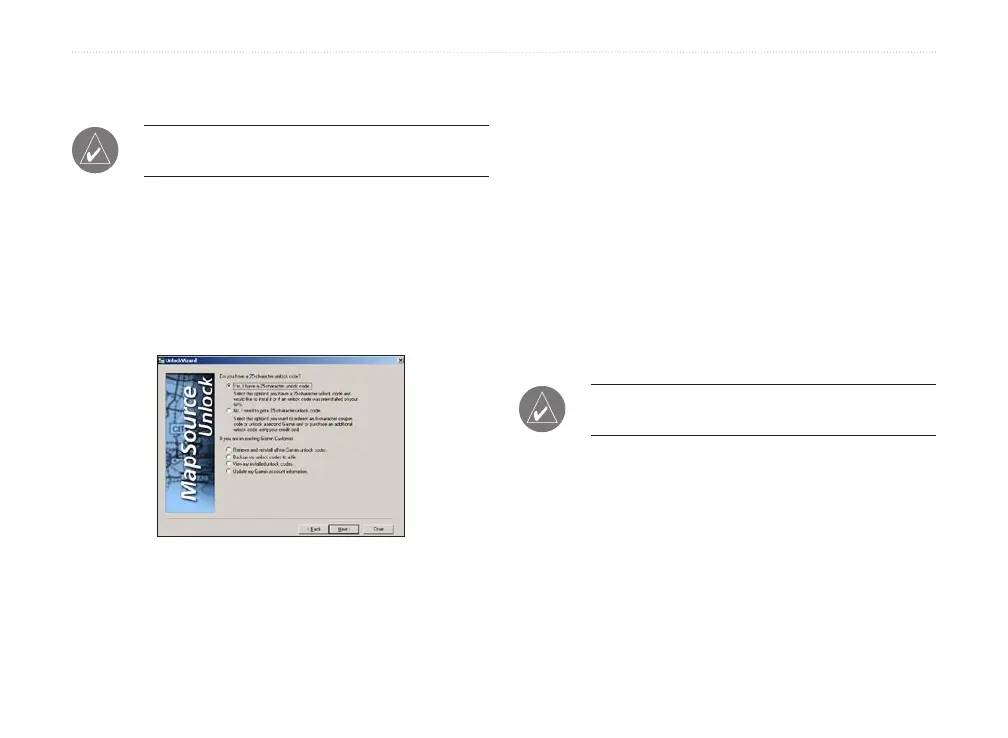
To unlock your product with a 25-Character
Unlock Code:
NOTE: An Internet connection is required for the
following procedure.
1. In MapSource, click Utilities > Unlock Maps.
Then click Next.
2. Click Yes, I have a 25-character unlock code.
Then click Next.
3. Click I have an Unlock certificate, I will type it
in. Then click Next.
UnlockWizard
4. Enter your 25-character unlock code and then a
comment, if desired. Click Next.
5. If you would like to register your product, you
can do so at this time by clicking Yes, I have
a new Registration Code. Enter the 7-digit
registration code on the yellow piece of paper.
Click Next and follow the on-screen instructions
to register your product.
If you would like to register your product later,
click No, I will register my product later and
click Next. You can now close the UnlockWizard
and use MapSource.
To unlock your product with an 8-character
Coupon Code:
NOTE: An Internet connection is required for the
following procedure.
1. In MapSource, click Utilities > Unlock Maps.
Then click Next.
2. Click No, I need to get a 25-character unlock
code. Then click Next.
3. Enter your personal information in the fields
provided and click Next.



 To Next Page