31
• Real-time speed indication: Real-time speed indicated in km/h or MPH.
• Intelligent battery capacity indication: Shows the percentage of
remaining battery capacity which accounts for total battery capacity.
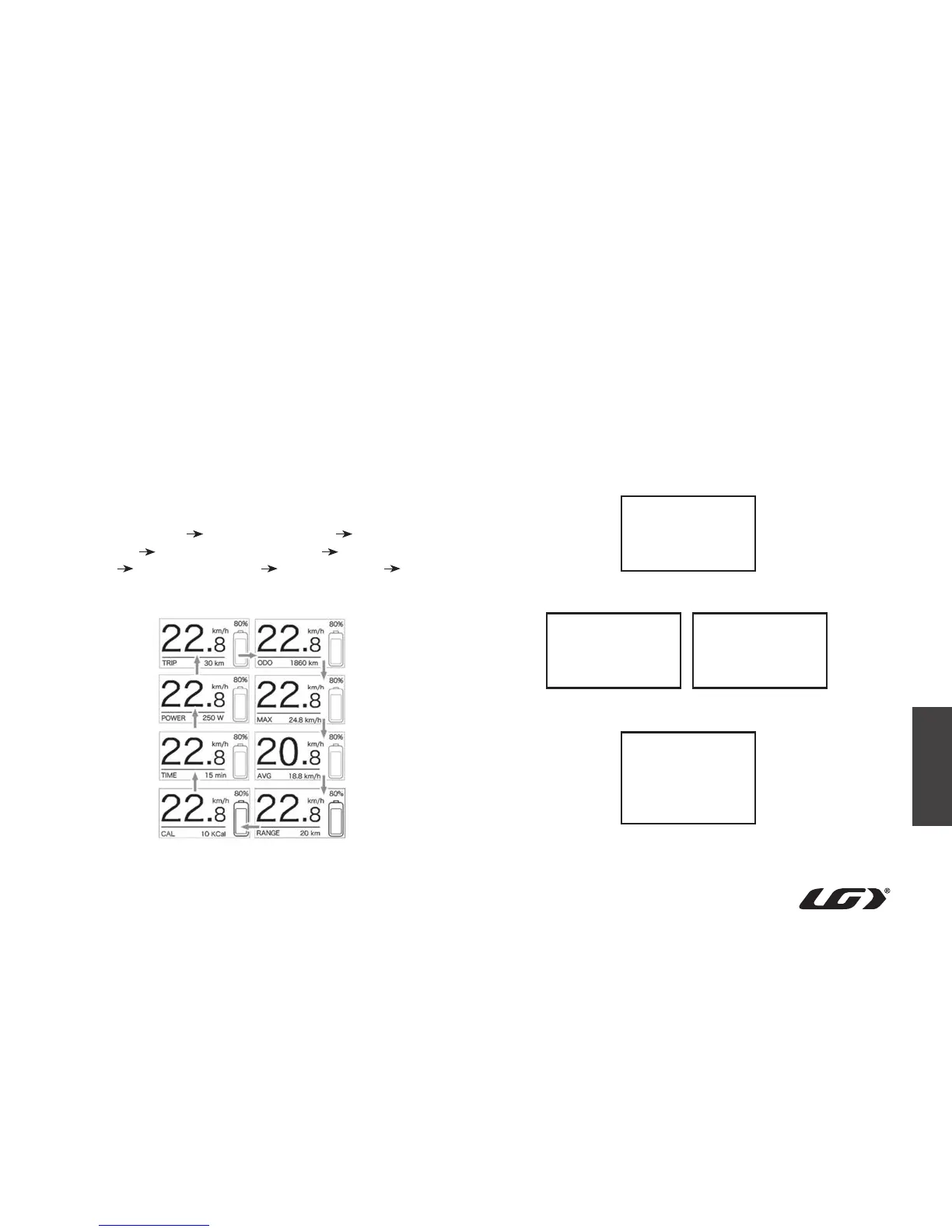
• Multiple function interface: Include single-trip distance (TRIP),
total distance (ODO), remaining distance (RANGE), output power
(POWER), energy consumption (CAL) and riding time (TIME).
• After startup, the default interface is TRIP (single trip distance).
Press MODE to switch between the different functions such as TRIP
(single trip distance) → ODO (total distance) → MAX (maximum
riding speed) → AVG (average riding speed) → RANGE (remaining
distance) → CALORIES/CAL (KCal) → TIME (riding time) → POWER
(output power).
• Assistance level indication: Indicates the current level from 1 to 5. If
no number is displayed, the power assistance is off.
Press and hold “+” and “-” buttons at the same time to enter the
menu list. Briefly press “+” or “-” buttons to select DISPLAY
SETTING, Information or EXIT, then briefly press ON/ OFF to select.
Interface for function selection
Interface for Display Setting selection
Interface for Information selection
Display Setting
Information
Exit
- Trip Reset
- Unit
- Brightness
- Auto Off
- Wheel Size
- Speed Limit
- Battery Info
- Error Code
- Back
- Back



 To Next Page