EasyManua.ls Logo

Garrett AT Pro INTERNATIONAL - User Manual

Garrett AT Pro INTERNATIONAL
31 pages
Print Icon
To Next Page IconTo Next Page
Loading...
© 2012 Garrett Electronics, Inc. PN 1533300.C.1012
1881 W. State Street
Garland, Texas 75042
Tel: 1.972.494.6151
Email: sales@garrett.com
Fax: 1.972.494.1881
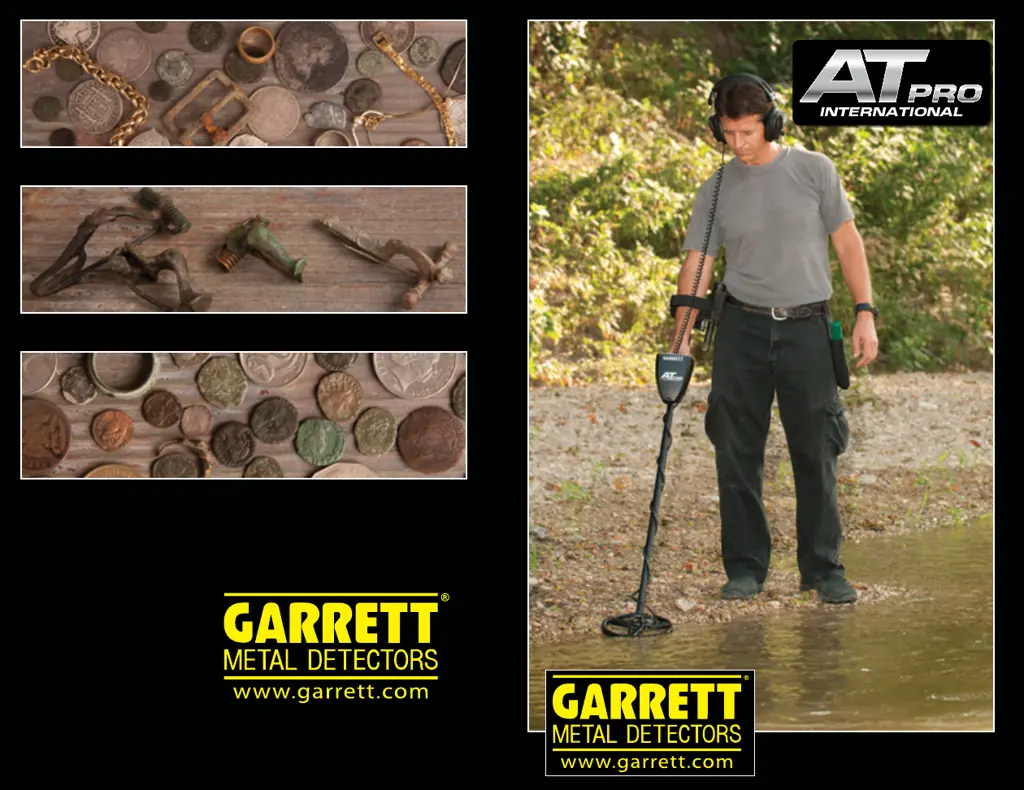
AT PRO INTERNATIONAL Owner’s Manual
Owner’s Manual
TM
e powerful, all-terrain solution for locating
deeply buried European coins and artefacts!

Questions and Answers

Summary

AT PRO CONTROL PANEL

QUICK START GUIDE

AT PRO COMPONENTS

LIST OF PARTS

ASSEMBLY

POWERING ON

SEARCH MODES

Overview of STD Mode vs PRO Mode

Compares the Standard and Professional modes of operation.

STANDARD (STD) DETECTION MODES

Details the features and operation of the Standard detection modes.

ZERO Mode

Explains the ZERO mode for detecting all metal types.

COINS Mode

CUSTOM Mode

PRO DETECTION MODES

Proportional Audio (Pro Mode)

Explains how proportional audio provides more target information.

TARGET ID INFORMATION

Target ID Legend

Describes the meaning of the Target ID Legend on the LCD.

Target ID Cursor (Upper Scale)

Explains the Target ID cursor and its scale.

Lower Scale

Details the Lower Scale (Notch Discrimination) functionality.

DIGITAL TARGET ID

TONE ID

DISCRIMINATION

Notch Discrimination

Explains how to manually modify the Notch Discrimination pattern.

Example: Manual Modification of Notch Discrimination Pattern

Illustrates the process of manually adjusting the discrimination pattern.

Iron Discrimination

IRON DISC Pushbutton

Details the function of the IRON DISC pushbuttons.

IRON AUDIO

IRON AUDIO Pushbutton

Describes how to turn the Iron Audio feature on and off.

SENSITIVITY

Sensitivity Indicator

Indicates the current sensitivity level on the LCD.

GROUND BALANCE

GND BAL Indicator

Shows where the Ground Balance setting is displayed on the LCD.

GND BAL Setting

Displays the current Ground Balance setting.

Manual Ground Balance

FREQUENCY ADJUSTMENT

PINPOINT; Freq Adjust Pushbutton

Describes the pushbutton used for frequency adjustment.

PINPOINTING

PINPOINT Pushbutton

Details the operation of the Pinpoint pushbutton.

Tip for narrowing the detection area

Coin Depth Indicator

Alternative pinpointing technique: DD-tip or tail

HUNTING TIPS

Tips for saltwater use

Tips for locating targets amongst terra cotta;hot rocks

Isolating adjacent targets

BENCH TESTS

Discrimination bench test

Guides on performing a bench test for discrimination settings.

Iron Audio bench test

Describes how to test the Iron Audio feature using bench tests.

UNDERWATER OPERATION

CARE AND MAINTENANCE

Battery Replacement

Detailed steps for replacing the detector's batteries.

TROUBLESHOOTING GUIDE

METAL DETECTING CODE OF ETHICS

CAUTIONS

WARRANTY & SERVICE

AT Pro ACCESSORIES

SUGGESTED READING

RAM BOOKS TITLES

European Metal Detecting Guide Preview of Pages

Summary

AT PRO CONTROL PANEL

QUICK START GUIDE

AT PRO COMPONENTS

LIST OF PARTS

ASSEMBLY

POWERING ON

SEARCH MODES

Overview of STD Mode vs PRO Mode

Compares the Standard and Professional modes of operation.

STANDARD (STD) DETECTION MODES

Details the features and operation of the Standard detection modes.

ZERO Mode

Explains the ZERO mode for detecting all metal types.

COINS Mode

CUSTOM Mode

PRO DETECTION MODES

Proportional Audio (Pro Mode)

Explains how proportional audio provides more target information.

TARGET ID INFORMATION

Target ID Legend

Describes the meaning of the Target ID Legend on the LCD.

Target ID Cursor (Upper Scale)

Explains the Target ID cursor and its scale.

Lower Scale

Details the Lower Scale (Notch Discrimination) functionality.

DIGITAL TARGET ID

TONE ID

DISCRIMINATION

Notch Discrimination

Explains how to manually modify the Notch Discrimination pattern.

Example: Manual Modification of Notch Discrimination Pattern

Illustrates the process of manually adjusting the discrimination pattern.

Iron Discrimination

IRON DISC Pushbutton

Details the function of the IRON DISC pushbuttons.

IRON AUDIO

IRON AUDIO Pushbutton

Describes how to turn the Iron Audio feature on and off.

SENSITIVITY

Sensitivity Indicator

Indicates the current sensitivity level on the LCD.

GROUND BALANCE

GND BAL Indicator

Shows where the Ground Balance setting is displayed on the LCD.

GND BAL Setting

Displays the current Ground Balance setting.

Manual Ground Balance

FREQUENCY ADJUSTMENT

PINPOINT; Freq Adjust Pushbutton

Describes the pushbutton used for frequency adjustment.

PINPOINTING

PINPOINT Pushbutton

Details the operation of the Pinpoint pushbutton.

Tip for narrowing the detection area

Coin Depth Indicator

Alternative pinpointing technique: DD-tip or tail

HUNTING TIPS

Tips for saltwater use

Tips for locating targets amongst terra cotta;hot rocks

Isolating adjacent targets

BENCH TESTS

Discrimination bench test

Guides on performing a bench test for discrimination settings.

Iron Audio bench test

Describes how to test the Iron Audio feature using bench tests.

UNDERWATER OPERATION

CARE AND MAINTENANCE

Battery Replacement

Detailed steps for replacing the detector's batteries.

TROUBLESHOOTING GUIDE

METAL DETECTING CODE OF ETHICS

CAUTIONS

WARRANTY & SERVICE

AT Pro ACCESSORIES

SUGGESTED READING

RAM BOOKS TITLES

European Metal Detecting Guide Preview of Pages

Garrett AT Pro INTERNATIONAL Specifications

General IconGeneral
BrandGarrett
ModelAT Pro INTERNATIONAL
CategoryMetal Detector
LanguageEnglish

Related product manuals