www.gateway.com
63
Norton 360 scans your computer for viruses and spyware and removes any that it finds. When
the scan is finished, a summary of fixed problems appears.
If you are using Norton Internet Security
Norton Internet Security automatically scans your PC regularly to keep you protected
but you can manually run a scan for viruses, spyware and other online threats:
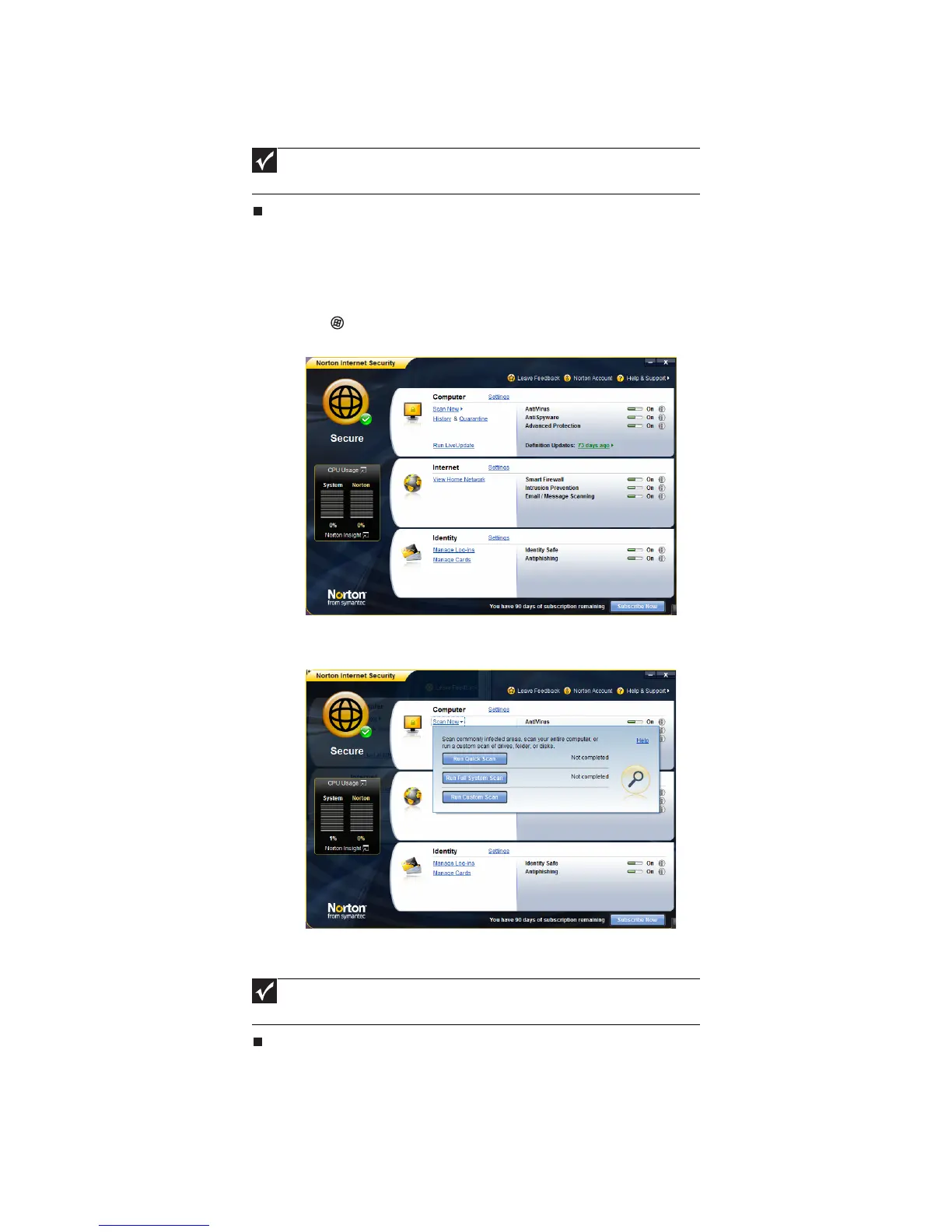
1 Click (Start), All Programs, Norton Internet Security then click Norton Internet
Security. Norton Internet Security opens.
2 Click, Scan Now. A pop-up window opens. Choose which scan you would like
to run.
Norton Internet Security scans your computer for viruses and spyware and removes any that it
finds. When the scan is finished, a summary of fixed problems appears.
Important
Extend your Norton 360 subscription before it expires to remain
protected against online threats.
Important
Extend your Norton Internet Security subscription before it expires
to remain protected against online threats.



 To Next Page