GBA
Global Bill Acceptors
GBA ST2
Operations Manual
Page 9 of 25
Astrosys International Ltd
January 2009
GBA ST2 Op Manual V1.01
5.1.3 Configuration Procedure – Programming Card
Equipment Required;
Program Card. (PC software is available to print these cards. Please consult your local sales
office)
Procedure;
1. Push button x3, the diagnostic LED will flash orange rapidly.
2. Insert the Program Card into the reader.
3. The Program Card will be taken into the validator and held for a small period of time, then
returned in one smooth movement
4. Configuration is complete.
Note:
Please ensure the programming card has been printed on a high quality printer with good
solid black lines on the card.
5.1.4 Configuration Procedure – Re-Calibration
Although calibration of the GBA ST2 is not a necessity it is recommended periodically for
preventative maintenance, and also after any change to the software configuration of the unit.
Equipment Required:
Calibration Paper.
Procedure:
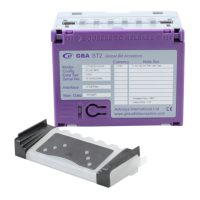
1. The push button is located on the purple lid of the unit
2. Push button x3, diagnostic LED will rapidly flash orange.
3. Insert the Calibration paper into the reader.
4. The reader will draw in the paper until it reaches the internal string gate. At this point it
will hold the paper momentarily before it is returned in several movements.
5. Remove the calibration paper from the note entry point.
6. Calibration is complete.
Note:
Please ensure the ST2 calibration paper has 2 chamfered corners. The part number for
this is ASY-W-10268
5.2 PC BASED GBA TOOLS
The GBA ST2 can also be configured using PC based software, GBA Talk. This software also
provides calibration and diagnostic functions.
NB for full instructions on the GBATalk software package refer to the GBATalk Manual.


 To Next Page