10
8. DIE SET USER MANUAL
The die sets for the AdvancedPunch Pro are intended to work with
multiple paper sizes and sheet feed directions. In order to
accommodate different sheet sizes this die set must be configured to
the correct number of punching pins and the die stop must be set to
the proper position. The die label contains information on the common
paper punching sizes, for the uncommon sizes please refer to Table 1.
Glossary
LEF- Long Edge Feed- Indicates that the paper is being fed through
the machine so that the longer side of the sheet will be punched.
SEF- Short Edge Feed- Indicates that the paper is being fed through
the machine so that the shorter side of the sheet will be punched.
Statement Paper- 8.5" X 5.5"
Legal Paper- 8.5" X 14"
Ledger Paper- 11" X 17"
Pin Numbering
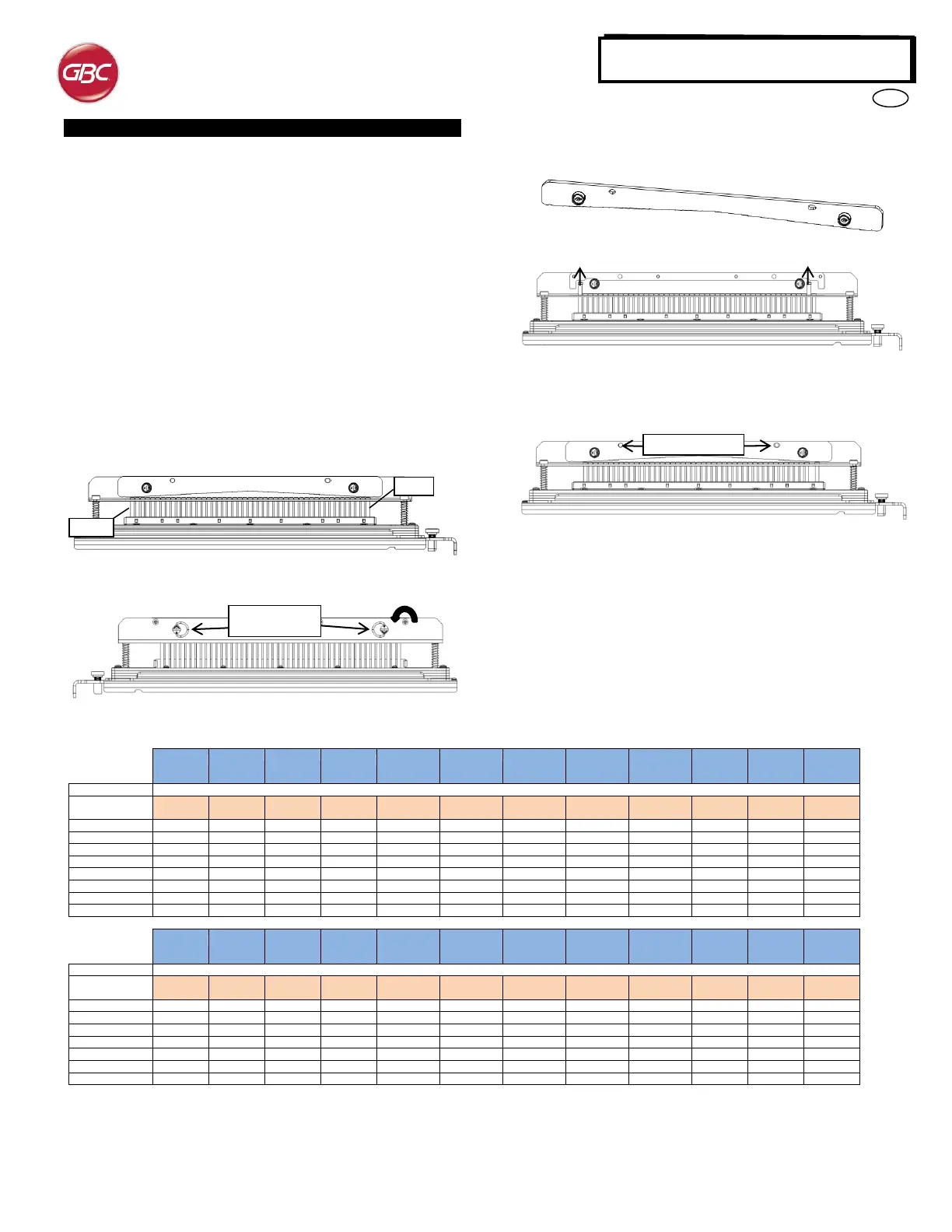
Die punching pins are numbered sequentially starting from the handle
end. Figure 8.1 shows a 47 hole coil die (008R13179) as an example.
All die sets follow the same pin numbering format.
Figure 8.1 Coil Die Set Pin Numbering
Figure 8.2 Pressure Bar Removal
To remove punch pins from the AdvancedPunch Pro first turn the two
Quarter Turn Fasteners counter clockwise to release the pressure bar.
Remove the pressure bar and set aside.
Figure 8.3 Pressure Bar
Figure 8.4 Pin Removal
Lift up and remove the desired pins according to Table 8.1. Store pins
in the pin storage tray inside front door of machine making sure pins
cannot be dropped, damaged or lost while removed.
Figure 8.5 Replace Pressure Bar
Replace the pressure bar by lining up dowel pin holes with exposed
dowel pins. Hold pressure bar so that it is seats completely over dowel
pins and then rotate Quarter Turn Fasteners clockwise until a click is
felt to lock pressure bar in position.
Important! Make sure pressure bar is attached and both Quarter Turn
Fasteners are in the locked position prior to inserting the die set into
the machine or serious damage can occur to both the machine and die
set.
Pin numbers to be removed based on paper size and orientation
Pin numbers to be removed based on paper size and orientation
*For CombBind 20H Configuration Pull Pin Number 1
Table 8.1 Pin Removal Guide
The above chart shows the information on which pins need to be removed to correctly punch each sheet size and configuration that the AdvancedPunch
Pro can accept. For standard offering dies not found in the chart no pin adjustment is necessary.


 To Next Page
 Loading...
