User’s Manual
13
To turn off the VCI module, press the power switch for 2~3 seconds or disconnect the DLC or cigar
power cable.
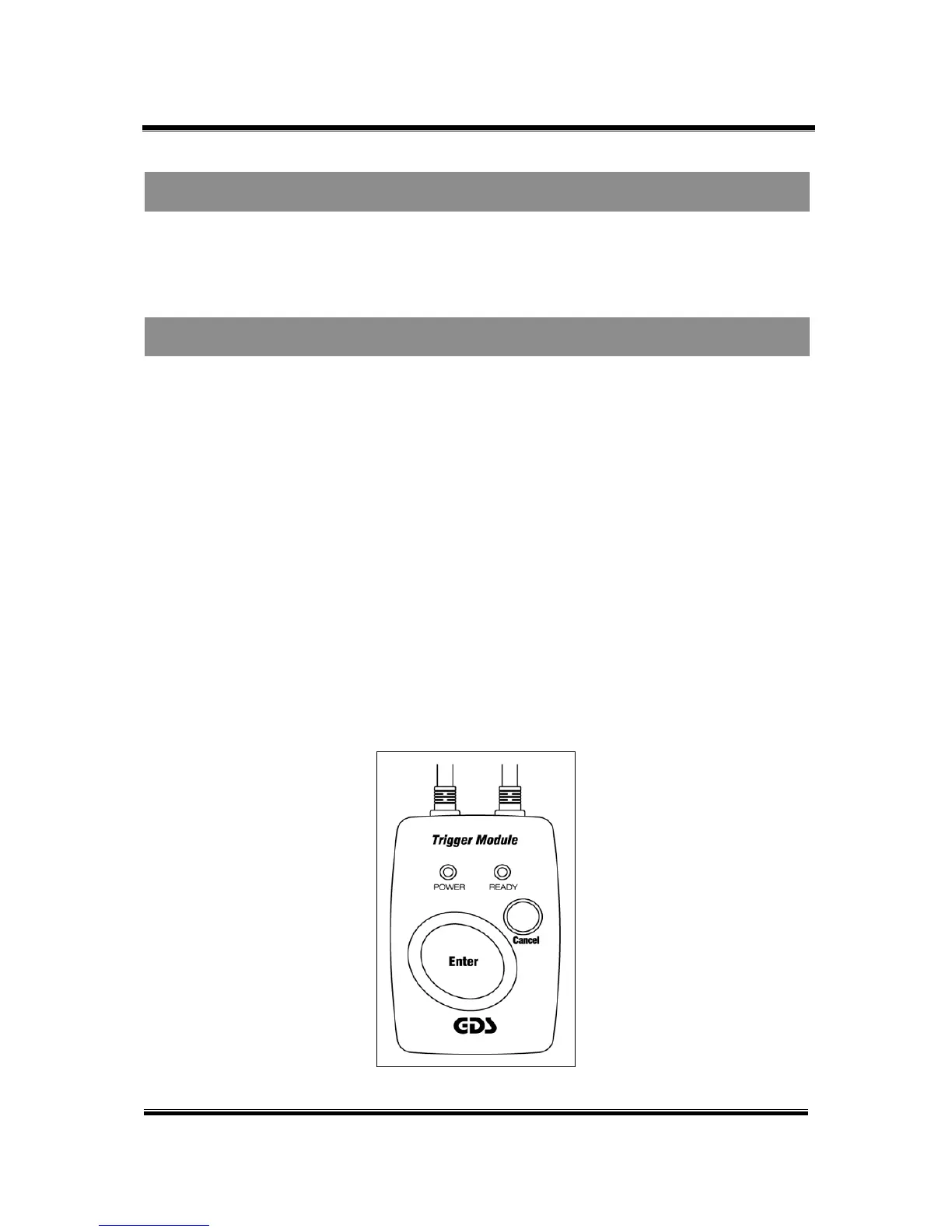
Trigger module switch operation (Enter / Cancel)
“ENTER” and “CANCEL” Buttons are on the trigger module. In Flight Record mode The VCI module
automatically starts recording data whenever it is switched on and each time the “ENTER” button is
pressed.
z Recorded communication data is stored in the VCI module memory by pressing “ENTER”
function during the Flight Record mode.
z Pressing the “CANCEL” button restarts the data recording process.
Trigger module LED (Power / Ready)
Trigger module has two different LED indicators.
z Power LED: Red Indicates DC power is available for VCI module.
z Ready LED: Green light displays two different ways. The flickering green light means the
recorded communication data is being stored after pressing the “ENTER” button and the
other normal green light means it is now collecting the data from the ECU.
Figure 3. Trigger module buttons and LED’s
Turn Off the VCI Module
Switch Operation of Trigger Module
Module: A-01-003 (p.03)


 To Next Page