38
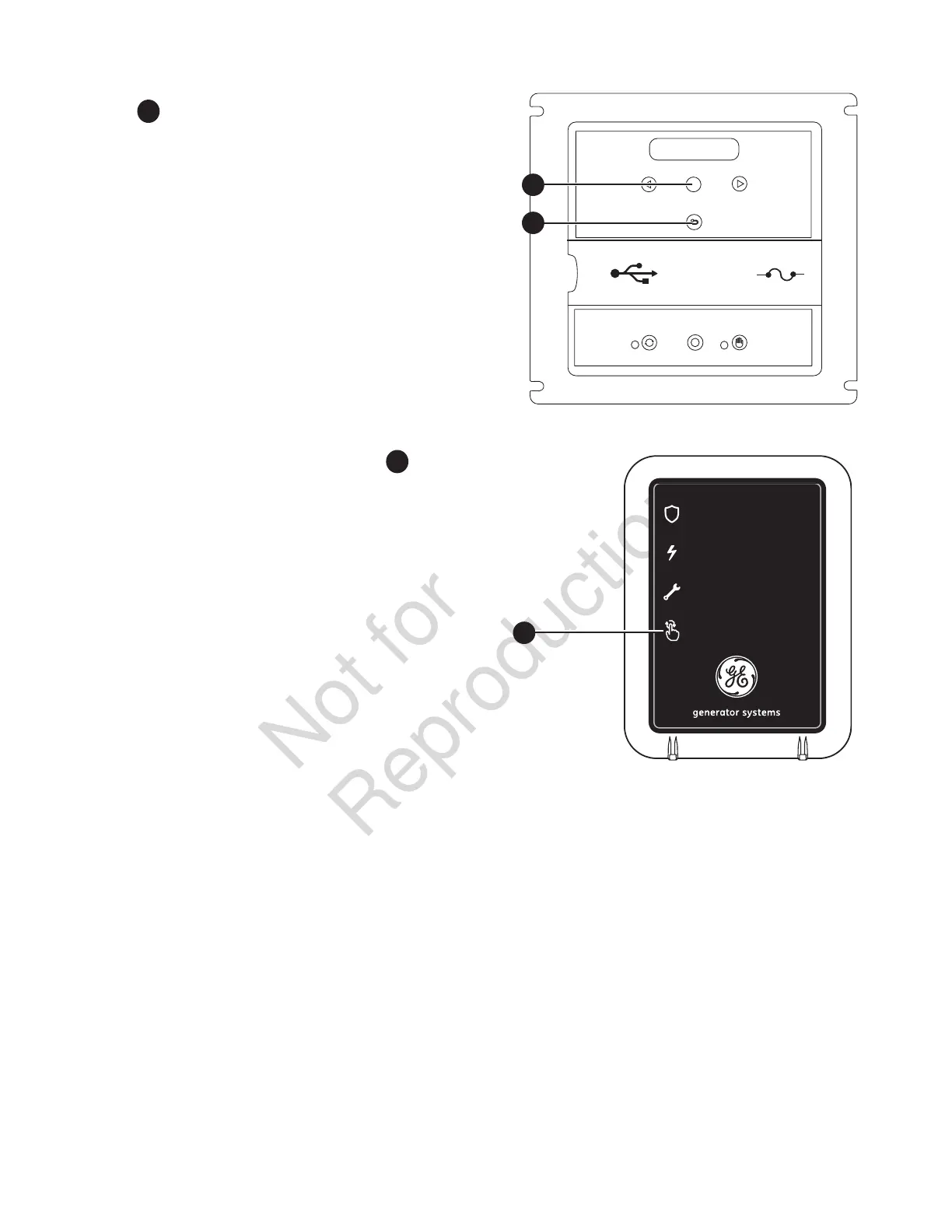
3. Locate the MENU AND ESCAPE buttons on the control
panel
A
. Press and hold for 3 seconds to enter the
linking mode.
4. “LINKING MODE” will scroll across the generator
control panel.
5. Locate and hold the SYSTEM UPDATE button
B
on
the wireless monitor for 5 seconds. All 3 LEDs will flash
until the monitor links to the generator. Once it links,
the monitor will display the current state. The monitor
will try to link for 1 minute. (This step can only be
completed when the generator is in Linking Mode).
6. Once the link has been confirmed, press the OK
button on the generator control panel to exit or the
control board will turn off linking after 5 minutes. The
generator will now communicate with the wireless
monitor.
NOTICE It may take up to 1 minute for the monitor to begin
displaying the generator status correctly.
ok
menu
esc
auto
off manual
B
generator power
service needed
generator ready
system update
1 low battery voltage
2 low uid level
3 under/over voltage
4 engine does not start
part #: 316196 fcc id: MCQ-XBS2C IC id: 1846A-XBS2C
5 low frequency
6 engine overspeed
7 high temperature
8 transfer switch
# of flashes service needed
A
A


 To Next Page