15
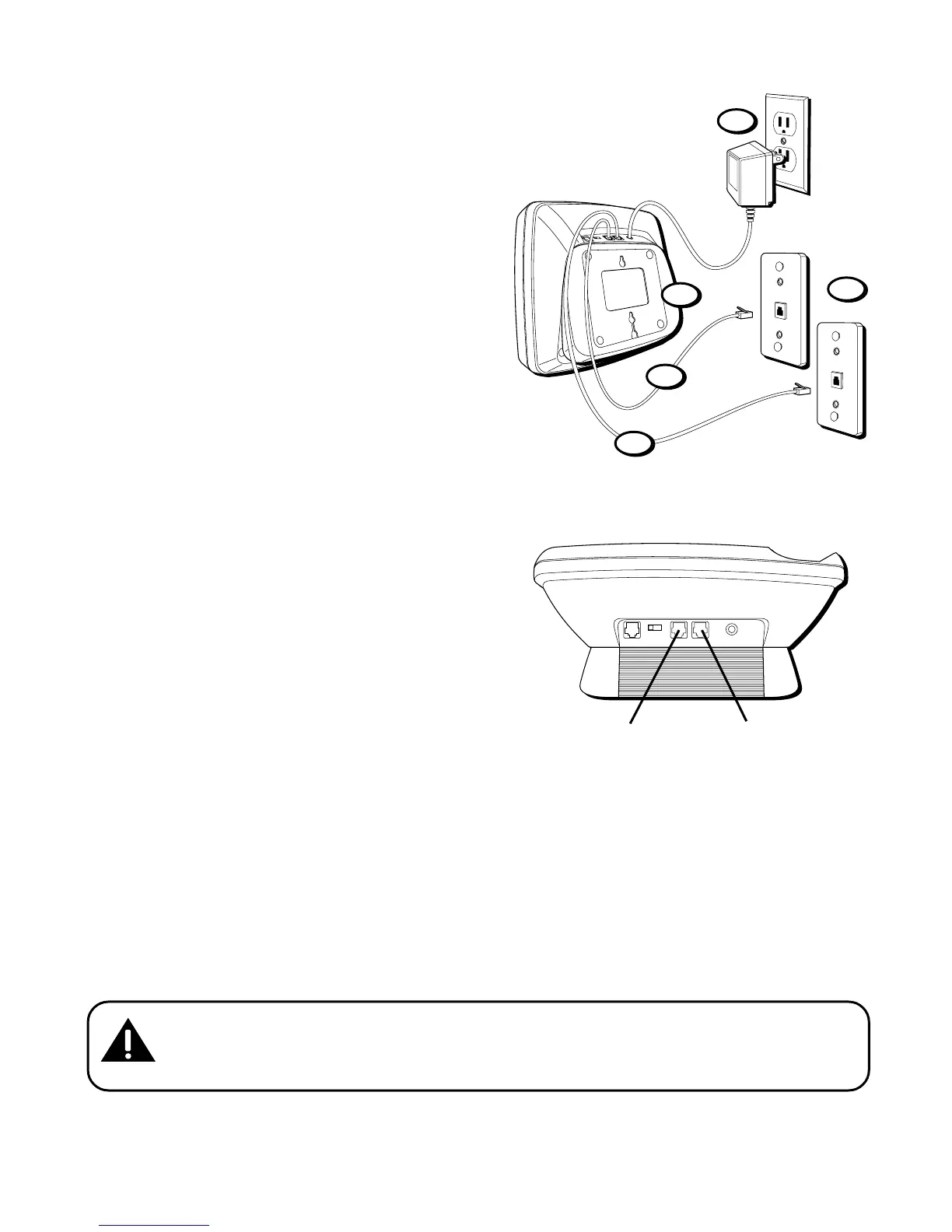
Each Line on a Separate Modular Jack
1. Remove the mounting bracket. Rotate
it so that the bottom of the phone is
flat. Reattach the wall mount bracket
by inserting the tabs into the slots on
the top of the unit first, and then
snapping the bottom tabs into place.
2. Plug the power supply cord into the
POWER 6V AC jack on the base and
into an AC outlet.
3. Plug the telephone line cord into the
jack marked LINE 1+2 on the back of
the unit and into a single line modular
jack you want to be line 1 .
4. Plug the other telephone line cord into
the jack marked LINE 2 on the back of
the unit and into the single line modular
jack you want to be line 2.
LINE 1+2 LINE 2DATA PORT
DATA PORT
2 1
POWER
6V AC
LINE 1+2 jack
LINE 2 jack
1
2
3
4
5
CAUTION: Use only the ATLINKS USA 5-2495 power supply that is
compatible with this unit. Using other power supplies may damage the
unit.



 To Next Page