GEAppliances.com
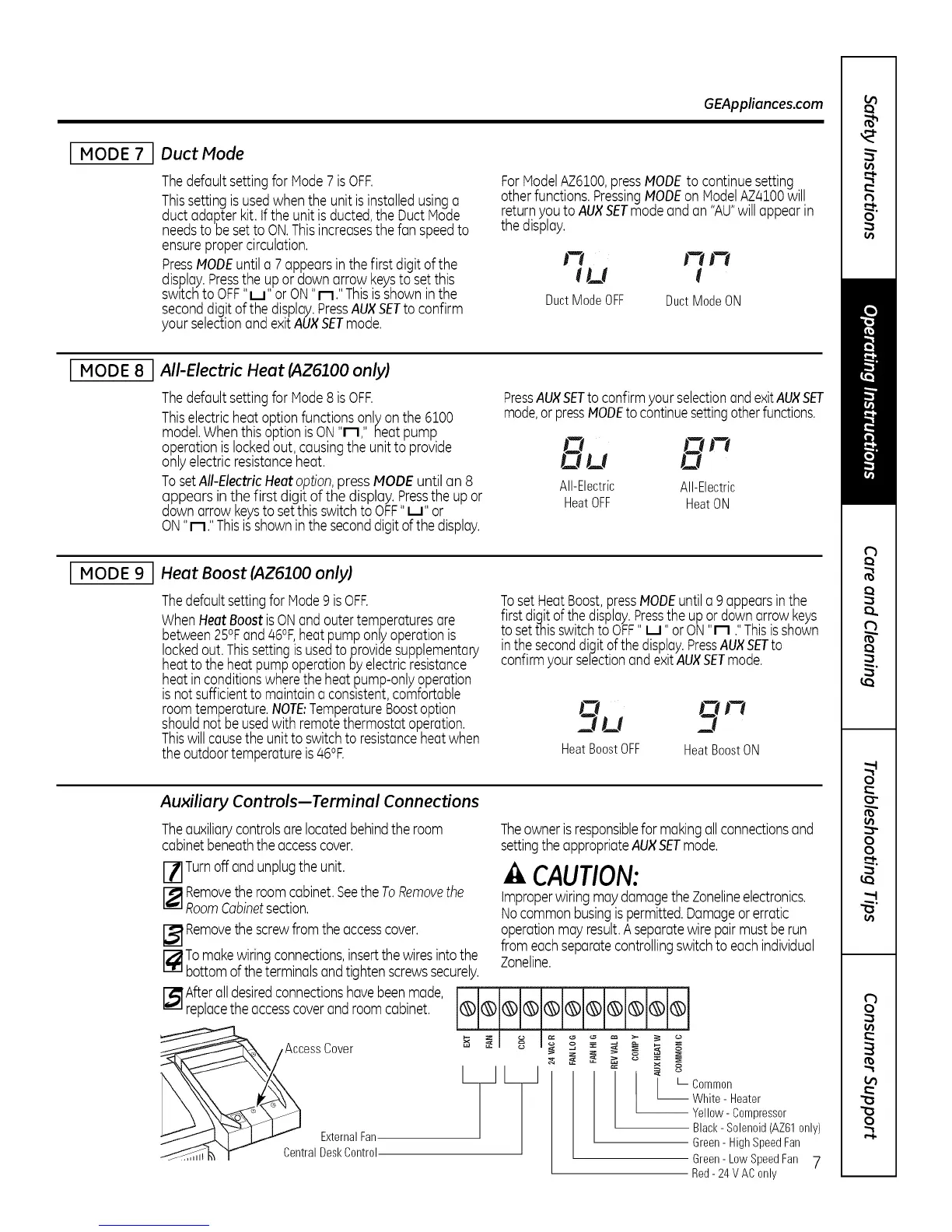
[ MODE 7 I Duct Mode
Thedefaultsettingfor Mode7isOFF.
Thissettingisusedwhen the unit is installedusinga
duct adapterkit.if theunitisducted,the Duct Node
needsto besetto ON.Thisincreasesthe fan speedto
ensurepropercirculation.
PressMODEuntil a 7 appearsin the first digit of the
display.Pressthe upor downarrow keysto setthis
sw_tchtoOFF"u" or ON"n." Thisisshowninthe
seconddigitofthedisplay.PressAUXSETto confirm
your selectionand exitAUXSETmode.
ForHodelAZ6100,pressMODEto continuesetting
otherfunctions.PressingMODEon ModelAZ/4IO0will
returnyouto AUXSETmodeandan "AU"willappearin
the display.
t7 J-i J-_
ILl I
DuctModeOFF DuctModeON
[ MODE 8 All-Electric Heat (AZ6100 only)
Thedefaultsettingfor Mode8isOFF.
Thiselectricheat optionfunctionsonlyonthe 6100
model.Whenthisoptionis ON"n," heat pump
operationis lockedout, causingthe unitto provide
onlyelectricresistanceheat.
TosetAll-ElectricHeatoption,press MODEuntil an 8
appears in the first digit of the display. Pressthe upor
downarrowkeysto setthisswitchto OFF"u" or
ON"n." Thisisshownin the seconddigit of the display.
PressAUXSETto confirmyourselectionandexitAUXSET
mode,or pressNODEto continuesettingotherfunctions.
on
All-Electric All-Electric
HeatOFF HeatON
[ MODE 9 Heat Boost (AZ6100 only)
ThedefaultsettingforHode9 isOFF.
WhenHeatBoostisONandoutertemperaturesare
between25°Fand46°F,heatpumponlyoperationis
lockedout.Thissettingisusedto providesupplementary
heatto the heatpumpoperationbyelectricresistance
heatin conditionswherethe heatpump-onlyoperation
isnotsufficientto maintaina consistent,comfortable
roomtemperature.NOTE:TemperatureBoostoption
shouldnot beusedwith remotethermostatoperation.
Thiswillcausethe unitto switchto resistanceheatwhen
theoutdoortemperatureis46°F.
TosetHeatBoost,pressMODEuntila 9appearsinthe
firstdigitofthedisplay.Presstheupor downarrow keys
to setthisswitchtoOFF"u" orON"n ."Thisis shown
intheseconddigit ofthedisplay.PressAUXSETto
confirmyour selectionandexitAUXSETmode.
HeatBoostOFF HeatBoostON
Auxiliary Controls--Terminal Connections
Theauxiliarycontrolsarelocatedbehindthe room
cabinetbeneaththeaccesscover.
Turnoff andunplugthe unit.
r--_Removetheroomcabinet.Seethe ToRemovethe
RoomCabinetsection.
[] Removethescrewfromthe accesscover.
I--_Tomakewiringconnections,insertthewiresintothe
bottomofthe terminalsandtightenscrewssecurely.
I_lAfter alldesiredconnectionshavebeenmade,
replacetheaccesscoverandroomcabinet.
ExternalFan
CentralDeskControl
Theownerisresponsiblefor makingallconnectionsand
settingtheappropriateAUXSETmode.
.4,CAUTION:
improperwiringmaydamagetheZonelineelectronics.
Nocommonbusingispermitted.Damageorerratic
operationmay result.Aseparatewirepairmustberun
from eachseparatecontrollingswitchto eachindividual
Zoneline.
o
o
z
z
,,<
z
oo
o°
I LCommon
_ hite - Heater
Yellow- Compressor
Black- Solenoid(AZ61only)
Green- HighSpeedFan
Green- LowSpeedFan 7
Red- 24V AConly


 To Next Page