67
09 Maintenance
User Manual V1.0-2023-10-30
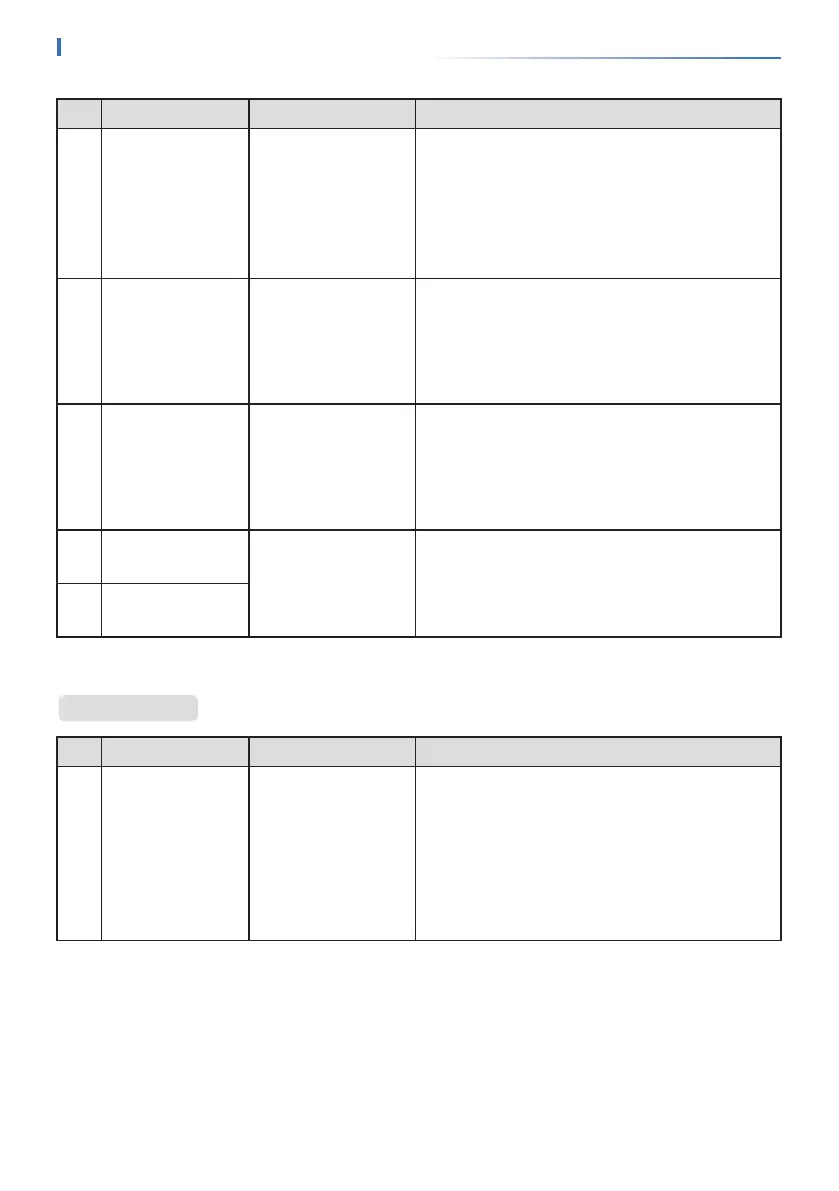
No� Fault Cause Solutions
31
PV Input
Overvoltage
The PV array
conguration is not
correct. Too many
PV panels are
connected in series
in the PV string.
Check the serial connection of the PV array.
Make sure that the open circuit voltage of the PV
string is not higher than the maximum operating
voltage of the inverter.
32
PV Continuous
Hardware
Overcurrent
1. The PV
conguration is
not proper.
2. The hardware is
damaged.
Disconnect the AC output switch and DC input
switch, then connect them 5 minutes later.
Contact the dealer or the after-sales service if the
problem persists.
33
PV Continuous
Software
Overcurrent
1. The PV
conguration is
not proper.
2. The hardware is
damaged.
Disconnect the AC output switch and DC input
switch, then connect them 5 minutes later.
Contact the dealer or the after-sales service if the
problem persists.
34
String1 PV String
Reversed
The PV string is
connected reversely.
Check whether the PV1 and PV2 strings are
connected reversely.
35
String2 PV String
Reversed
No� Fault Cause Solutions
1
Abnormal
parallel CAN
communication
The parallel
communication
cable connection
is abnormal, or
an inverter in the
parallel system is
oine.
Check whether all the inverters are powered on
and whether the parallel communication cables
are rmly connected.
Parallel System


 To Next Page