EN
18
9007210246122763 © 05-2023
971.552.00.0(01)
Operation
Display of operating state
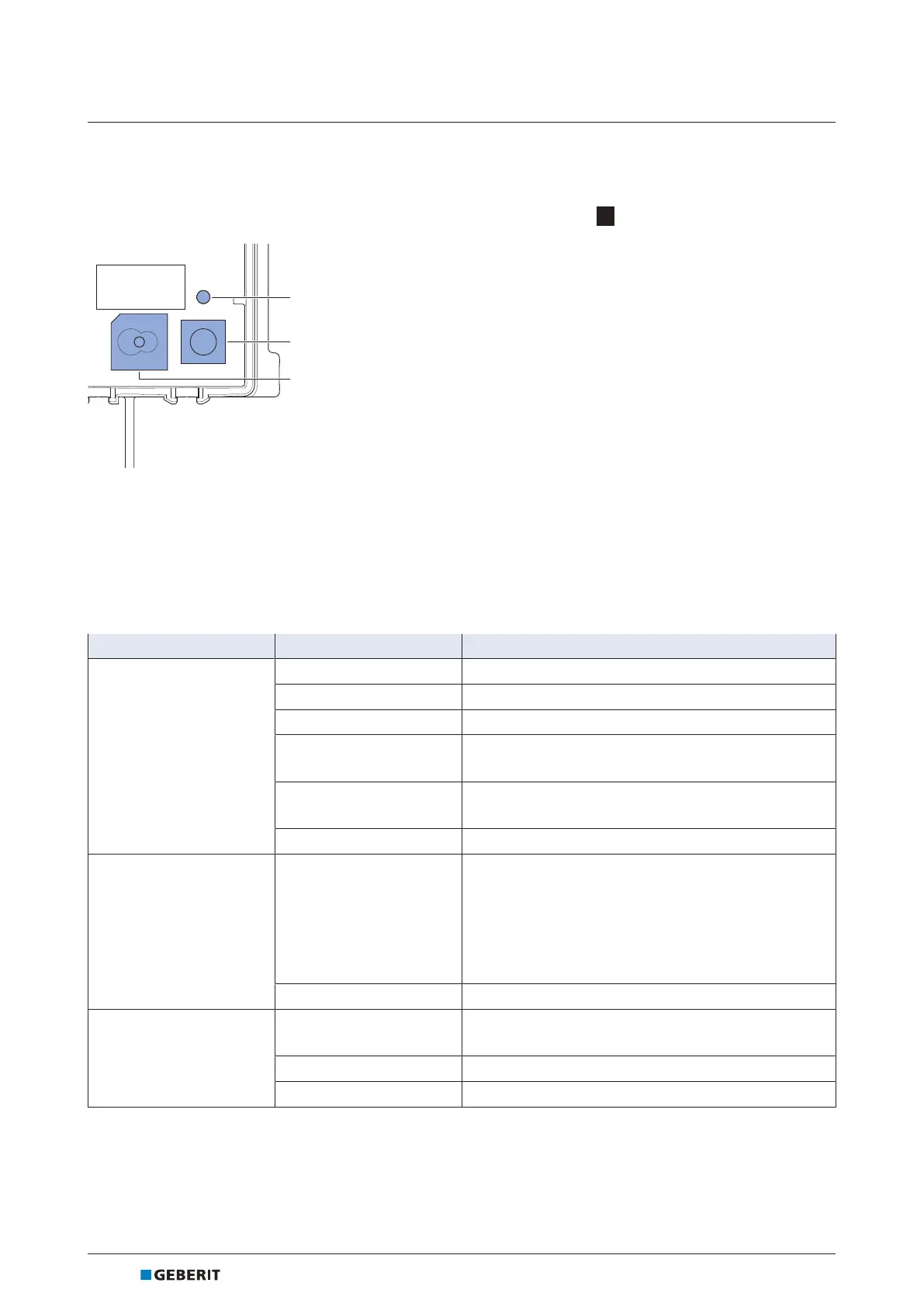
The operating state of the Geberit HS30 and HS50 hygiene flush units is displayed on the control unit. The
control unit is accessible once the cover plate has been detached. → See 1 , page147.
Figure2: Displays and controls on the control unit
1 Status LED
2 <Test> button
3 Buzzer
Table1: Displays and controls
Element Status Meaning
Status LED
Off
• No operating voltage
Lights up green
• Normal operation
Flashes green
• Solenoid valve open
Lights up orange
• Warning, diagnose with Geberit Control app
• Addressing via GEBUS pending
1)
Lights up red
• Malfunction, diagnose with Geberit Control app
• Basic settings not configured
Flashes green/red
• Localisation of the hygiene flush unit
1)
<Test> button
Press button for <5s
• Solenoid valve test: after releasing the button, the
solenoid valves open one after the other for 5s
• When the solenoid valve test is active: cancel test
• In the event of an active malfunction: suppress
buzzer
• Identification of the hygiene flush unit
2)
Press button for >5s
• Pair with the Geberit Control app
Buzzer
3)
Off
• Normal operation
• Buzzer deactivated
On
4)
• Malfunction, diagnose with Geberit Control app
Beeps every second
• Localisation of the hygiene flush unit
1)
1) Only when connected to GEBUS, → see Geberit Connect system manual
2) When the button is pressed, the hygiene flush unit is highlighted in the Geberit Control app under [My end devices].
3) The buzzer is deactivated ex works. It can be reactivated in the Geberit Control app if required.
4) The buzzer can be suppressed by pressing the <Test> button.



 To Next Page