EN
9007210246122763 © 05-2023
971.552.00.0(01)
21
Checking the backpressure
sensor
1 Demount the cover plate. → See 1 ,
page147.
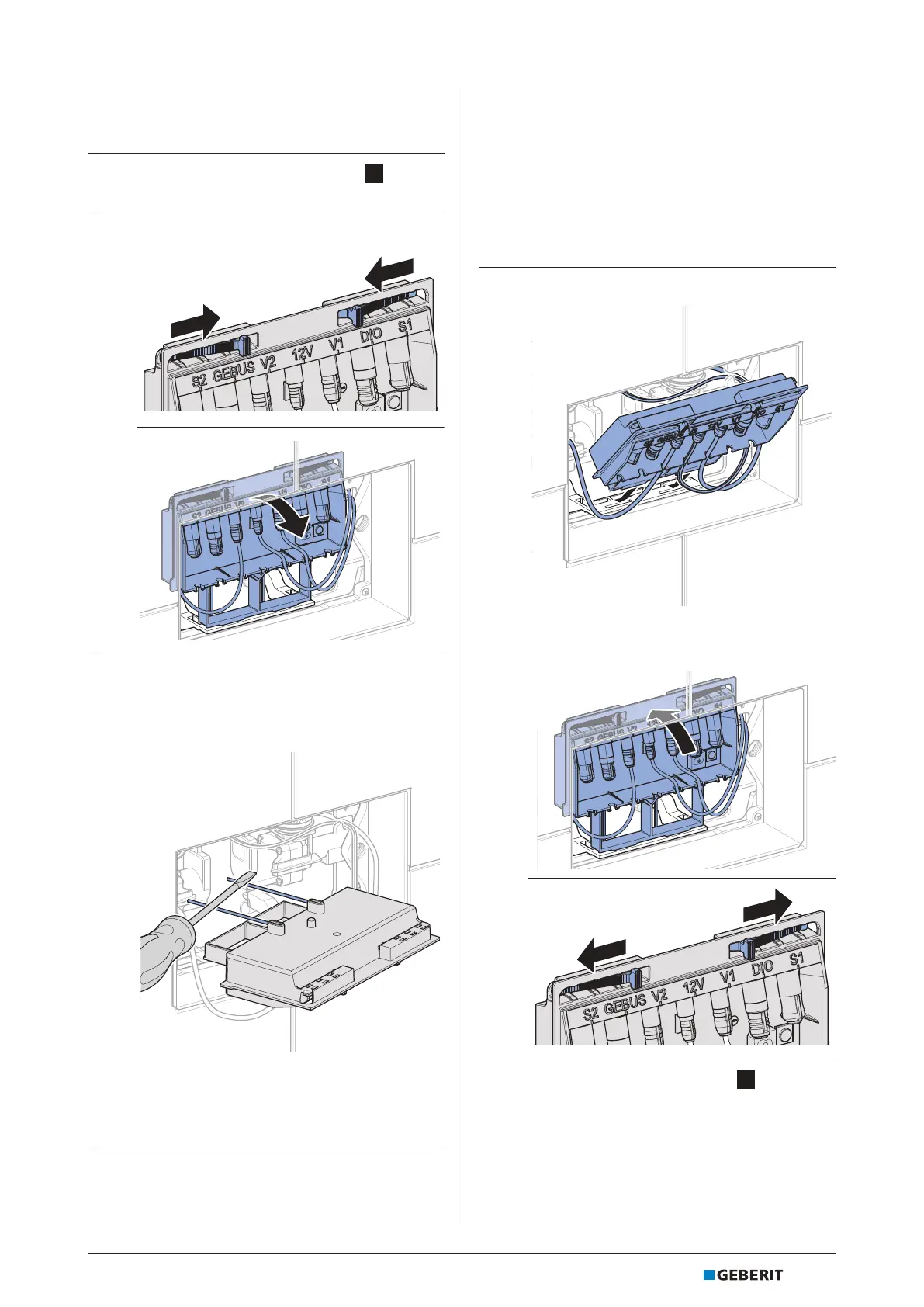
2 Loosen the control unit and fold it forwards.
3 Short-circuit both of the backpressure
sensor’s metal brackets on the rear of the
control unit with an electrically conductive
object.
✓ If the backpressure sensor is working,
the status LED lights up red, the buzzer
sounds and the fault is displayed in the
Geberit Control app.
4 Check the metal brackets for scaling. Clean
with a soft cloth and descaling agent if
required.
ATTENTION
Surface damage caused by scratching
Risk of corrosion if the gold-plated surface of the
metal brackets is damaged.
▶ Do not clean the metal brackets with abrasive
or scratching tools.
5 Plug the control unit into the retainer.
6 Snap the control unit into place.
7 Mount the cover plate. → See 6 , page151.



 To Next Page