EasyManua.ls Logo

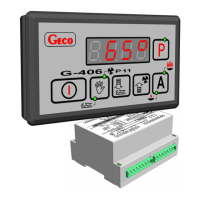
Geco G-406-P11 - User Manual

Geco G-406-P11
14 pages
Print Icon
To Next Page IconTo Next Page
Loading...
USER MANUAL FOR THE
AUTONOMOUS CONTROL UNIT
(A.C.U.)
G-406-P11
TO CONTROL CENTRAL
HEATING BOILERS
FOR PELLETS
Program version: 10
You are politely requested for the familiarization with the manual prior to making the connection and
activating any of our machines. Should you have any doubts, please do not hesitate to contact our firm
between 8 a.m. and 16 p.m..
Note:
The most recent update release date is provided at the bottom of each following page. Please, always
use the most recent version of the manual, which can be obtained by mail free of charge after the
previous order.

Questions and Answers

  • G
    Gregory WagnerAug 12, 2025
    What to do if Geco Control Unit display is blinking and cannot be turned on?
    • J
      Jordan AguilarAug 12, 2025
      If the display of your Geco Control Unit is blinking and cannot be turned on, check the value of the power supply voltage, the condition of the feeding connectors, and how the feeding connectors are screwed in. Also, verify the correctness of the connection of the actuating module with the control panel. If the problem persists, try connecting another data transfer tape.
  • M
    Matthew LeonAug 19, 2025
    How to fix erroneous temperature indications on Geco Control Unit?
    • B
      Brandon RamosAug 19, 2025
      If your Geco Control Unit is showing erroneous temperature indications, check the connection of the sensors to the connector and ensure the sensors are fastened correctly. Inspect the sensor cable for any damages and carefully examine the external surface of the sensor shell for mechanical injuries. As a final step, connect another data transfer tape.
  • R
    riverarobynAug 27, 2025
    How to fix a dim display on Geco Control Unit?
    • S
      Sandra BoydAug 27, 2025
      If the display of your Geco Control Unit remains dim even when connected to the mains, check if the 230 V voltage is present on terminals L and N. Verify the correctness of the connection between the actuating module and the control panel. Try removing and reapplying the data transfer tape sockets, or connect another data transfer tape.
  • K
    Kaitlin FergusonSep 4, 2025
    Why is my Geco Control Unit operating strangely?
    • M
      Mr. Daniel HoustonSep 4, 2025
      If your Geco Control Unit is operating abnormally, check the following: Ensure that 230V voltage is present on terminals L and N. Inspect the condition of the feeding connectors and wiring system, considering the number of connected devices on one phase. Verify that the control panel, actuating module, and tape plugs have not been exposed to water, liquids, moisture, or sudden temperature fluctuations. Confirm the correct connection of the actuating module with the control panel. As a last resort, try connecting another data transfer tape.

Geco G-406-P11 Specifications

General IconGeneral
BrandGeco
ModelG-406-P11
CategoryControl Unit
LanguageEnglish

Related product manuals