Upgradeable PDU Instruction Manual28
© 2017 Geist
GM1157
Mac
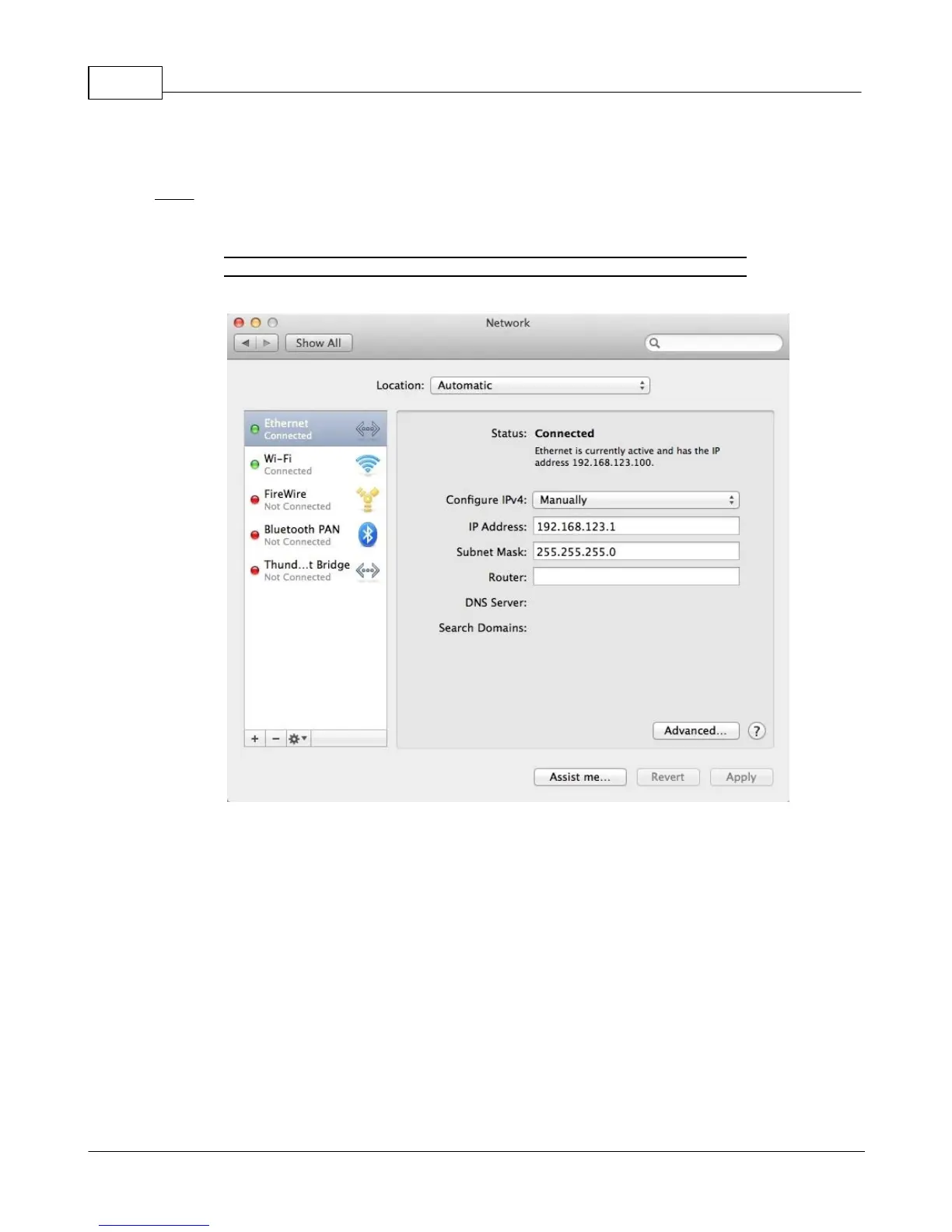
Click the System Preferences icon on the Dock, and choose Network.
Figure 2-18 Mac System Preferences
Be sure Ethernet is highlighted on the left side of the NIC window. In most cases, there will be one
Ethernet entry on a Mac. Write down the current settings so you can restore them to normal after you
have completed the setup procedure.
Select Manually from the Configure IPv4 drop-down list, then set IP Address to 192.168.123.1 and
Subnet Mask to 255.255.255.0. (The Router and DNS Server settings can be left blank for this initial
setup.) Click Apply when finished.
Once the NIC settings are configured properly, you should be able to access the unit by typing
http://192.168.123.123 into the address bar of your web browser. If you are setting up the unit for the
first time, or if the unit has been reset back to factory defaults via the network-reset button, the unit will
require you to create an Admin account and password before you can proceed.
Once you have created the Admin account and logged into it, the unit's default Sensors page should
come up by default. Navigate to the System tab, then the Network page to configure the device's



 To Next Page