“NO NETWORK” will appear on the display if the
unit is not correctly paired or wired with the
Network Adapter.
BLUE
FLASHING
BLUE
ON
GREEN
ON
GREEN
ON
BLUE
OFF
GREEN
ON
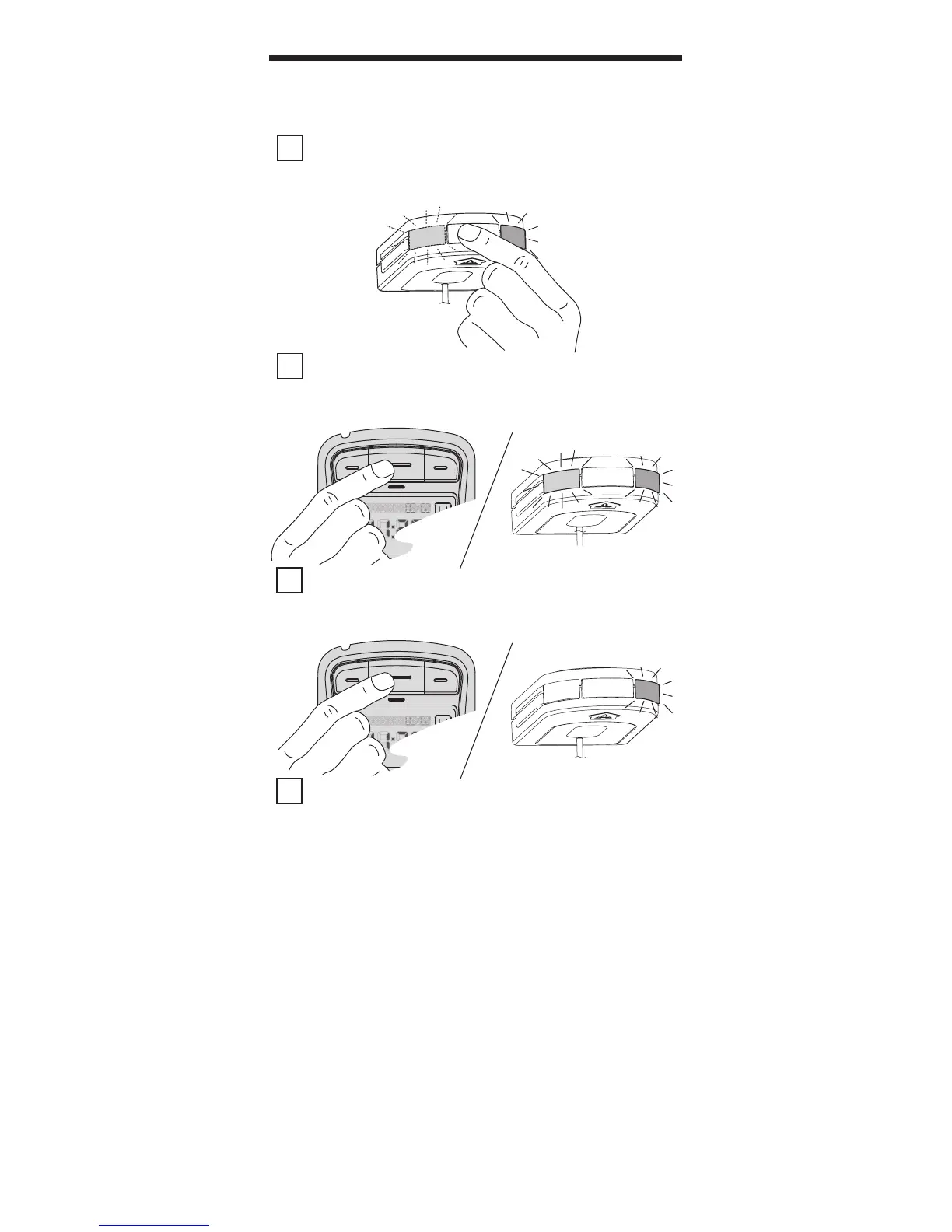
1 PRESS & RELEASE the button on the end of the
Network Adapter. The GREEN LED will stay on while the
BLUE LED ashes on and o.
2 PRESS & RELEASE one of the Opener Control
buttons on the IWC. The BLUE LED on the Network
Adapter will go steady ON.
3 PRESS & RELEASE the same Opener Control
button again. The BLUE LED on the Network Adapter will
turn OFF.
4 PRESS & RELEASE the same Opener Control
button again and the opener will run—moving the door.
LEARNING TO THE OPENER(S)
8
REPEAT THESE SAME STEPS in order to program one of the
other buttons to an additional opener.
REMINDER: Additional openers must be equipped with a Network Adapter.



 To Next Page