Limit switch adjustments must be completed
before running contact reverse test.
, Test contact reverse.
. Open door using wall control.
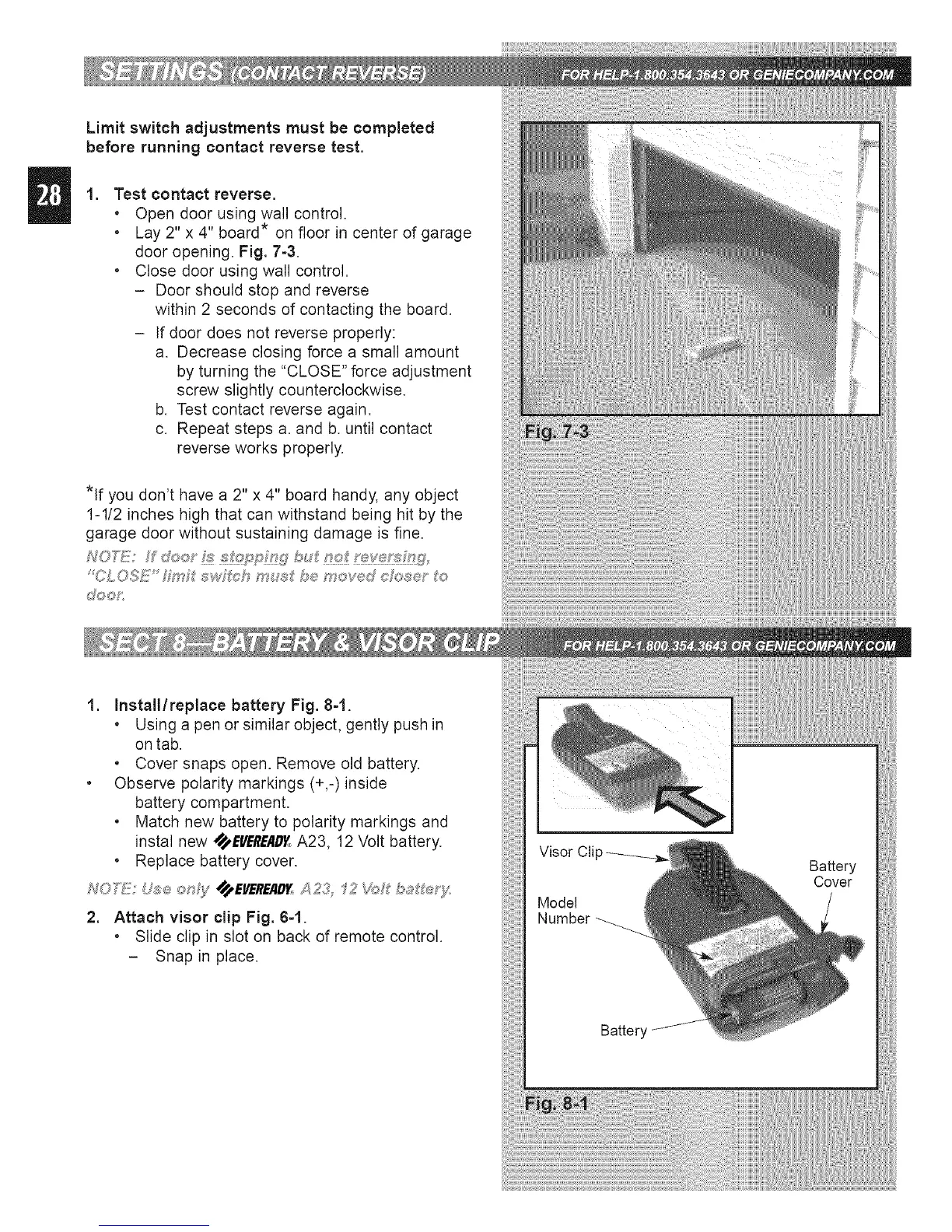
. Lay 2" x 4" board* on floor in center of garage
door opening. Fig. 7-3.
. Close door using wall control.
- Door should stop and reverse
within 2 seconds of contacting the board.
- If door does not reverse properly:
a. Decrease closing force a small amount
by turning the "CLOSE" force adjustment
screw slightly counterclockwise.
b. Test contact reverse again.
c. Repeat steps a. and b. until contact
reverse works properly.
*If you don't have a 2" x 4" board handy, any object
1-1/2 inches high that can withstand being hit by the
garage door without sustaining damage is fine.
NOD!:!!: do_:y _ _!_:_?P_::_WX7bu_ _t_;__;t f_;W
'CLOSE _4_ _,_wfch mu_ be mov®d c_2_e' o
d%_oP:
1. Install/replace battery Fig. 8-1.
. Using a pen or similar object, gently push in
on tab.
. Cover snaps open. Remove old battery.
. Observe polarity markings (+,-)inside
battery compartment.
. Match new battery to polarity markings and
instal new SS_,EVEREAD_A23, 12 Volt battery.
• Replace battery cover.
2. Attach visor clip Fig. 6-1.
. Slide clip in slot on back of remote control.
- Snap in place.




 To Next Page