Bluetooth Low Energy Operation
To use Bluetooth Low Energy your iOS
device does not have to join Airconsole
WIFI.
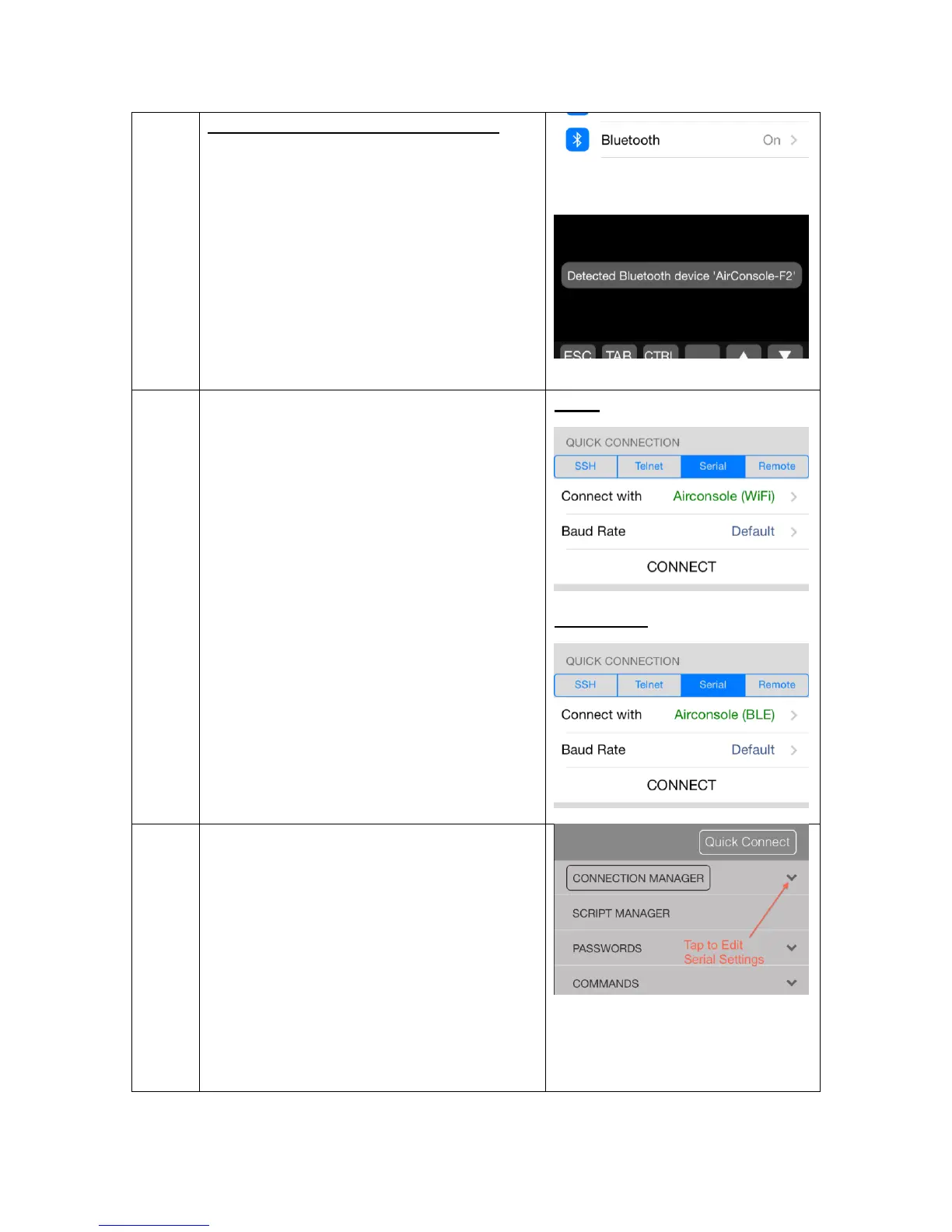
Ensure Bluetooth is enabled in your
iOS device settings
Launch Get Console App, Bluetooth
adaptor will be auto-discovered and
appear as option in Quick Connection
list (see step 4 below)
Launch the Get Console or RapidSSH
App.
When “Serial” is selected as the
connection type, the Airconsole is the
default choice for all serial connections.
If Airconsole WIFI is detected as well
as Airconsole Bluetooth, then Get
Console will default to the WIFI
connection as provides for higher
speeds.
To use a supported Redpark cable
instead of Airconsole, select “Cable” in
the “Connect with” dialog.
The Baud rate and other serial
parameters can be modified via the
Session Manager either before or after
the connection is established.
To modify after serial session has been
made, tap the green outlined
connection manager button, and then
the settings cog icon under the serial
session. From this page the various
baud rate, flow control and bit settings
can be modified.


 To Next Page