- 14 -
Hardware Installation
Before installing a memory module, make sure to turn off the computer and unplug the
power cord from the power outlet to prevent damage to the memory module.
Be sure to install DDR5 DIMMs on this motherboard.
1
2
2
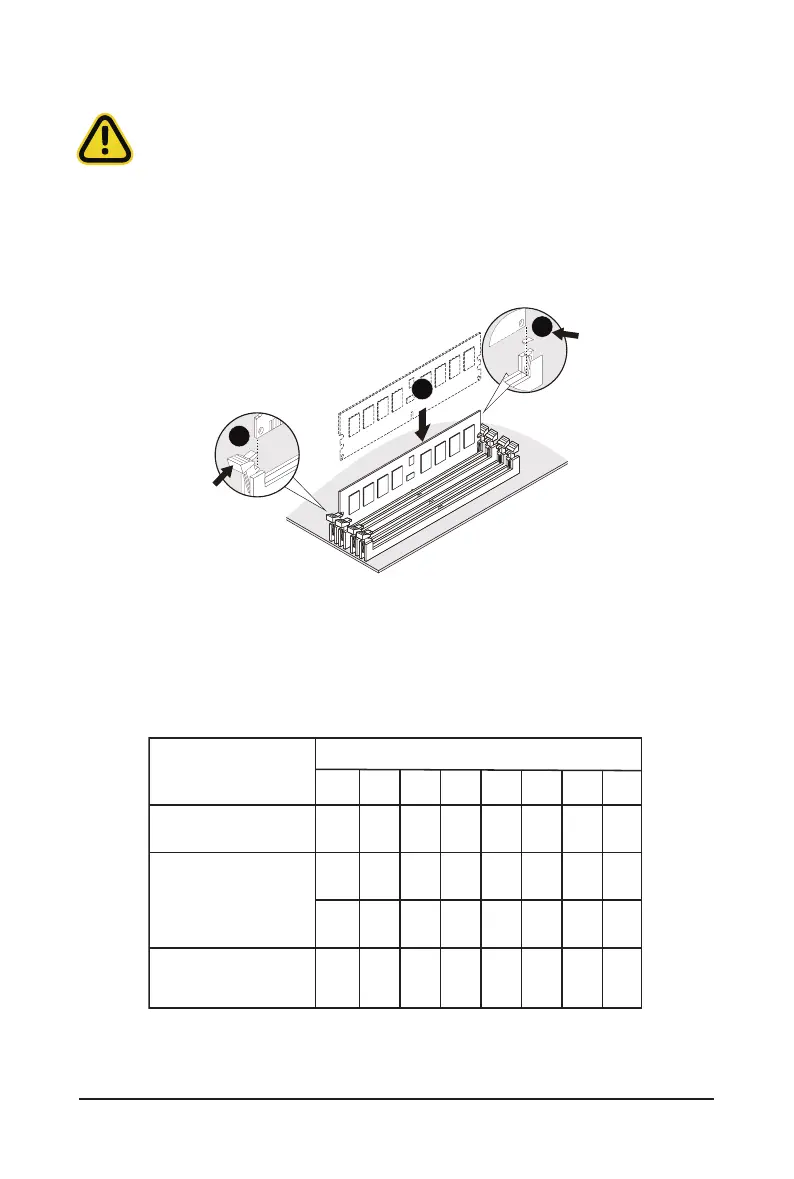
Follow these instructions to install a DIMM module:
1. Insert the DIMM memory module vertically into the DIMM slot and push it down.
2. Close the plastic clip at both edges of the DIMM slots to lock the DIMM module.
3. Reverse the installation steps when you want to remove the DIMM module.
Processor and Memory Module Matrix Table
1-4-2 Installing and Removing a Memory Module
4 DIMM
Memory Q’ty
for each CPU
1 DIMM
8 DIMM
CPU0
H0 B0F0 E0 C0 D0G0 A0
V
V
VV
V V
VV
V
VV VVV V VV



 To Next Page