- 23 -
Hardware Installation
21
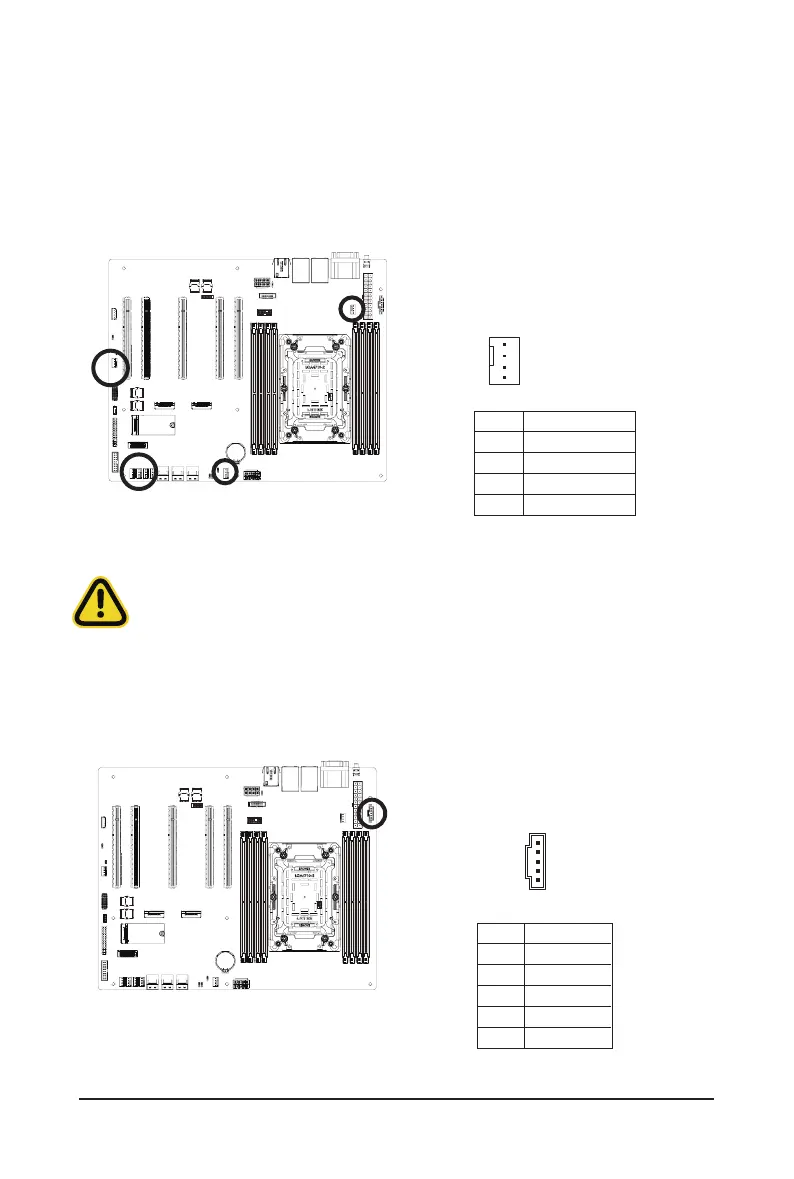
3/6/8/15) CPU0_FAN / SYS_FAN1, SYS_FAN2, SYS_FAN3, SYS_FAN4, SYS_FAN5 , SYS_
FAN6 (CPU Fan / System Fan Connectors)
The motherboard has one 4-pin CPU fan header (CPU_FAN), and two 4-pin (SYS_FAN) system fan headers.
Most fan headers possess a foolproof insertion design. When connecting a fan cable, be sure to connect
it in the correct orientation (the black connector wire is the ground wire). The motherboard supports CPU
fan speed control, which requires the use of a CPU fan with fan speed control design. For optimum heat
dissipation, it is recommended that a system fan be installed inside the chassis.
Pin No. Denition
1 GND
2 +12V
3 Sense
4 Speed Control
•
Be sure to connect fan cables to the fan headers to prevent your CPU and system from
overheating. Overheating may result in damage to the CPU or the system may hang.
•
These fan headers are not configuration jumper blocks. Do not place a jumper cap on the
headers.
2) PMBus Connector
The Power Management Bus (PMBus) is a variant of the System Management Bus (SMBus) which is
targeted at digital management of power supplies.
Pin No. Denition
1 PMBus Clock
2 PMBus Data
3 PMBus Alert
4 GND
5 3.3V Sense
4
1
1
5
21



 To Next Page