User Guide
GD32450Z-EVAL
22
5.5. USART_Echo_Interrupt_mode
5.5.1. DEMO purpose
This demo includes the following functions of GD32 MCU:
Learn to use the USART transmit and receive interrupts to communicate with the
serial terminal tool.
5.5.2. DEMO running result
Download the program < 05_USART_Echo_Interrupt_mode > to the EVAL board,
connect serial cable to COM0 and jump JP13 to USART. Firstly, all the LEDs are turned
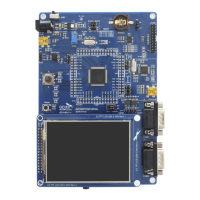
on and off for test. Then, the COM0 sends the tx_buffer array (from 0x00 to 0xFF) to the
serial terminal tool supporting hex format communication and waits for receiving data of
same bytes from the serial terminal. The data MCU has received is stored in the rx_buffer
array. After that, compare tx_buffer with rx_buffer. If tx_buffer is same with rx_buffer,
LED1, LED2, LED3 flash by turns. Otherwise, LED1, LED2, LED3 toggle together.
The output information via the serial port is as following.
5.6. USART_DMA
5.6.1. DEMO purpose
This demo includes the following functions of GD32 MCU:
Learn to use the USART transmit and receive data using DMA.
5.6.2. DEMO running result
Download the program < 06_USART_DMA > to the EVAL board, connect serial cable to
COM0 and jump JP13 to USART. Firstly, all the LEDs are turned on and off for test. Then,
the COM0 sends the tx_buffer array (from 0x00 to 0xFF) to the serial terminal tool
supporting hex format communication and waits for receiving data of same bytes as
tx_buffer from the serial terminal. The data MCU have received is stored in the rx_buffer
array. After that, compare tx_buffer with rx_buffer. If tx_buffer is same with rx_buffer,
LED1, LED2, LED3 flash by turns. Otherwise, LED1, LED2, LED3 toggle together.


 To Next Page