12
Memory functions:
recalling and deleting result from the
memory
The multiCare-in meter stores up to 500 test results for
all analytes, letting you review them in order from the
recent (“1”) to the oldest (“500”).
If you insert the data-chip of glucose into the meter,
you allow to recall only previous glucose test results.
It’s all the same for other analytes.
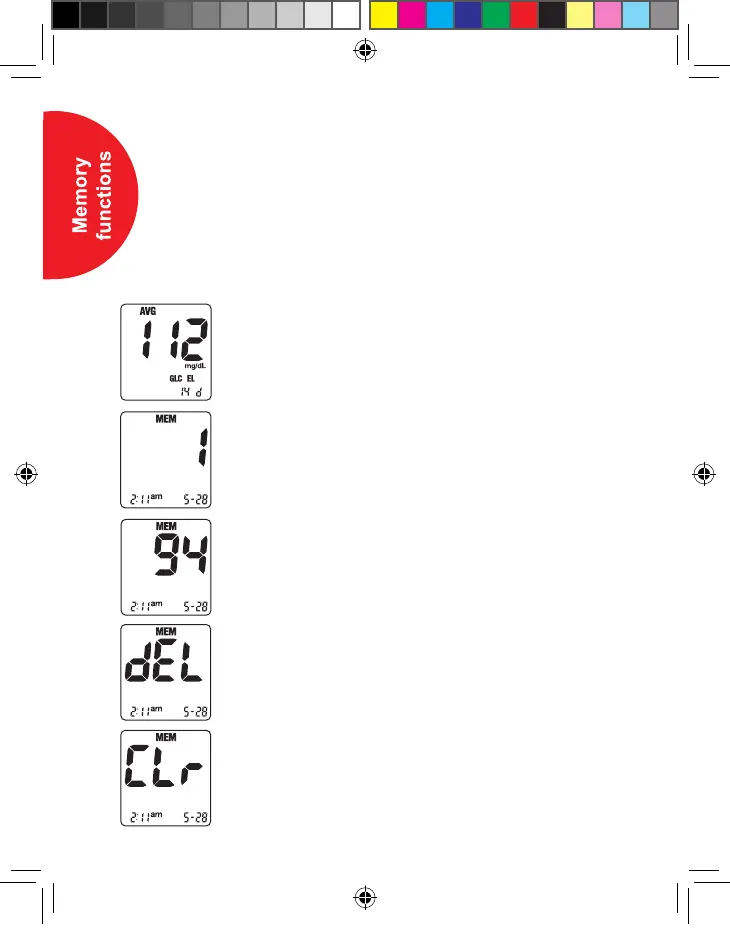
1. Press and release the “+” or “-” button in the
STANDBY mode.
The meter will enter MEMORY mode and the
average of test results is displayed.
2.
While pressing the “+” or “-” button, memory number
will be displayed. If you hold down the “+” or “-”
button, the meter scrolls quickly and only memory
positions are displayed. A result is not shown until
you release the button. When release the “+” or “-”
button, the corresponding result will be displayed.
3. Repeat step 2 to see the remaining stored results.
4. Keep the power button pressed and then press the
“-” button for 1 second to delete one test result
stored in the meter.
5. Press “-” button for 5 seconds together with the
power button to delete all test results stored in
the meter.
Manuale MCIN UK_ED2013 APRILE MFAP Definitivo.indd 12 13/06/2013 16:52:39


 To Next Page