Start-up and installation
8
11.2020/V 2.3
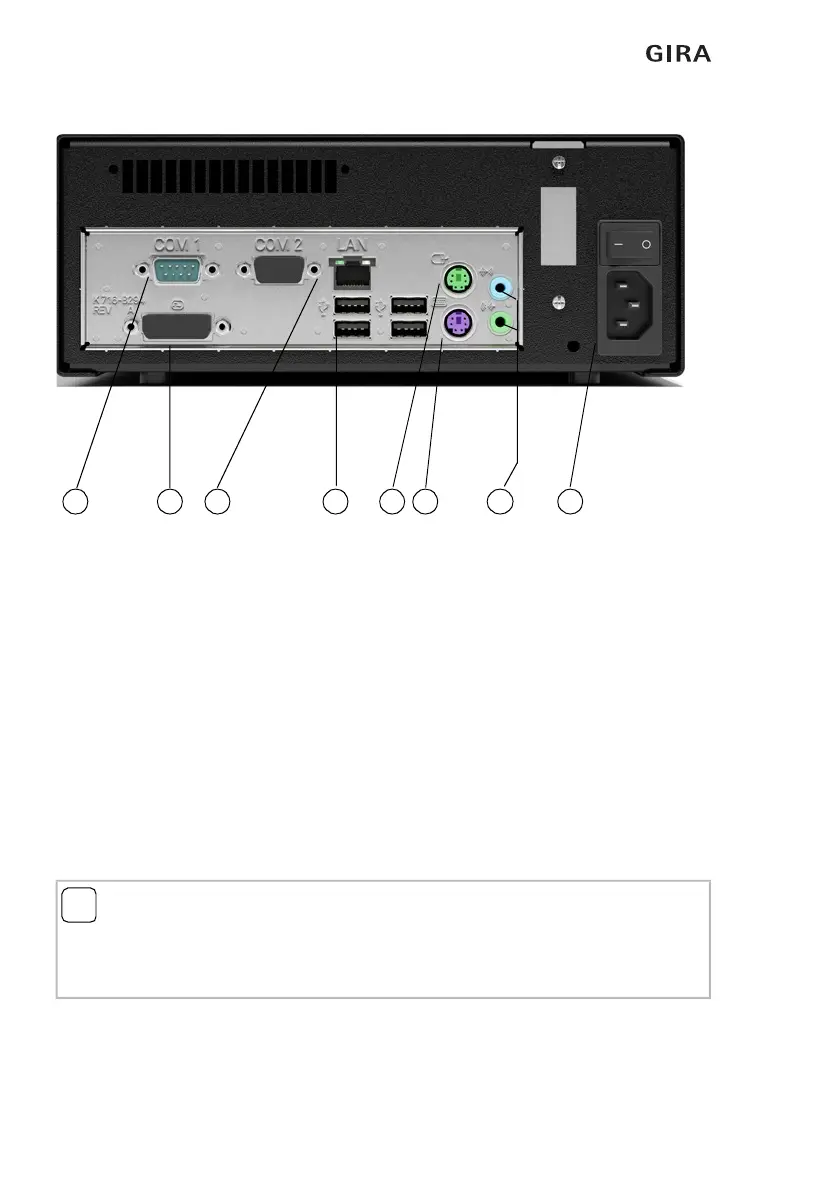
Fig. 1.2: Interfaces on the back of the Gira HomeServer
Interfaces on the back of the Gira HomeServer:
– 230 V mains connection (1) and ON/OFF switch
– PS2 connection for mouse (2), without function
– PS2 connection for PC keyboard (3), for service purposes
– DVI connection for PC monitor (4), for service purposes
– RJ45 network connection (5)
– USB interfaces (6), bus access via USB, USB-ISDN adapter,
– USB keyboard, for service purposes (e.g. firmware update via USB memory stick
with version 4.9 and higher)
– RS232 interface (7), no function
– Jack sockets (8), no function
i
Note: LEDs at the network connection.
The network connection has a green and a yellow LED. Both LEDs light up or flash when
there is a network connection to the Gira HomeServer. The LEDs only flash when the Gira
HomeServer is switched on. A valid IP address is not required.
7
4
5
6 2 3 8
1


 To Next Page