Home
Glidecam
Professional Video Accessories
2000 Pro
Page 14
Glidecam 2000 Pro - Page 14
32 pages
Manual
Save Page as PDF
To Next Page
To Next Page
To Previous Page
To Previous Page
Loading...
14
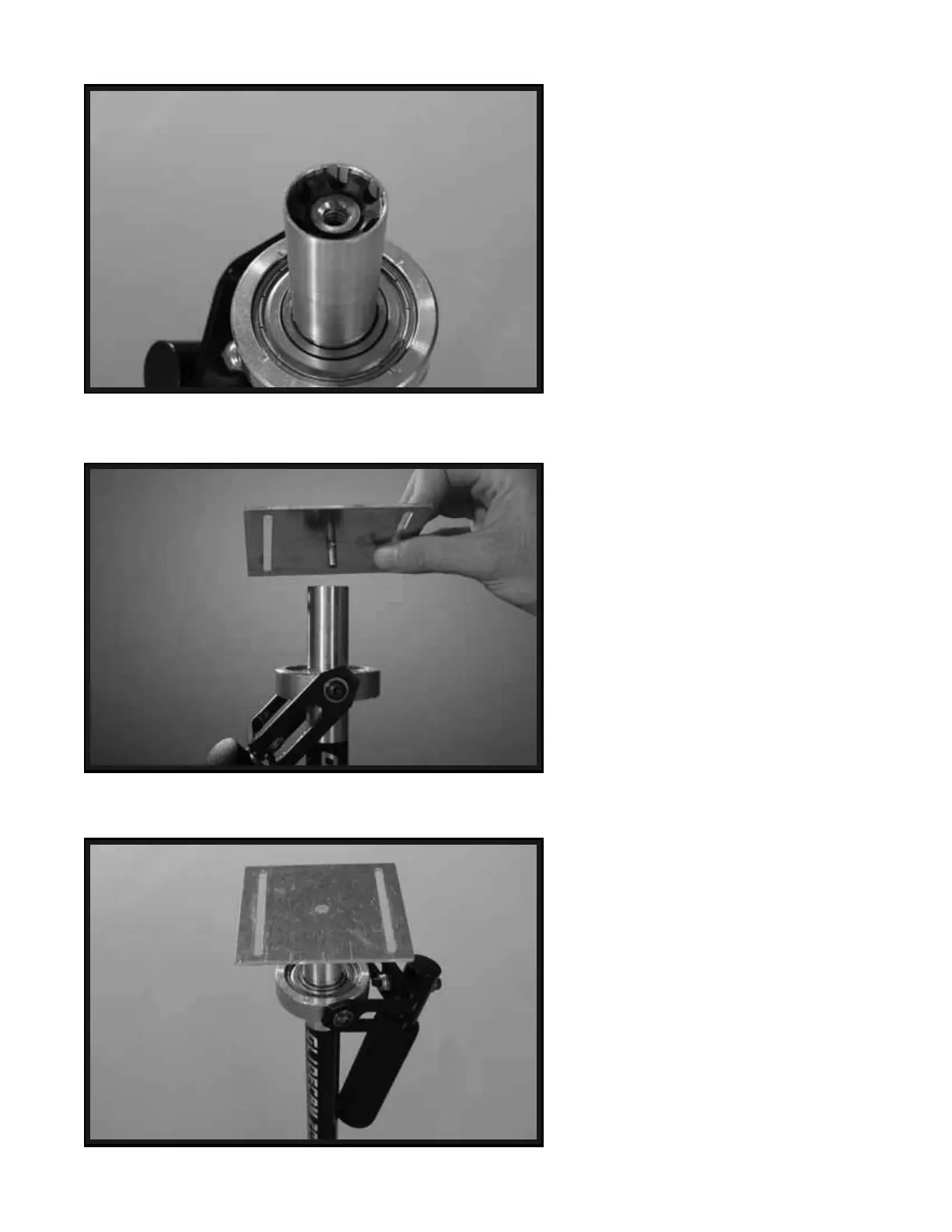
This is a photo
of the THREADED
INSER
T in the top of the CENTRAL
POST
.
Rotate and screw the BOTTOM PLA
TE
into the THREADED INSER
T in the top
of the CENTRAL
POST
.
Tighten
the BOTTOM PLA
TE to the top
of CENTRAL PO
ST
to
e
nsure a
tight fit.
27
28
29
13
15
Table of Contents
Main Page
Table of Contents
1
Introduction
3
Glidecam 2000 Pro Parts and Components
4
Assembling Your Glidecam 2000 Pro
8
Attaching Your Camera to Your Glidecam
17
Balancing Your Glidecam 2000 Pro
20
Handling Your Glidecam 2000 Pro
25
Operating Your Glidecam 2000 Pro
26
Shooting Tips
28
Improper Techniques
29
Other Camera Attachment Methods
30
Professional Usage
30
Maintenance
31
Warnings
31
Warranty
32


 To Next Page