Glidermatic GRD+ Installation Instructions & owner’s manual Page 11
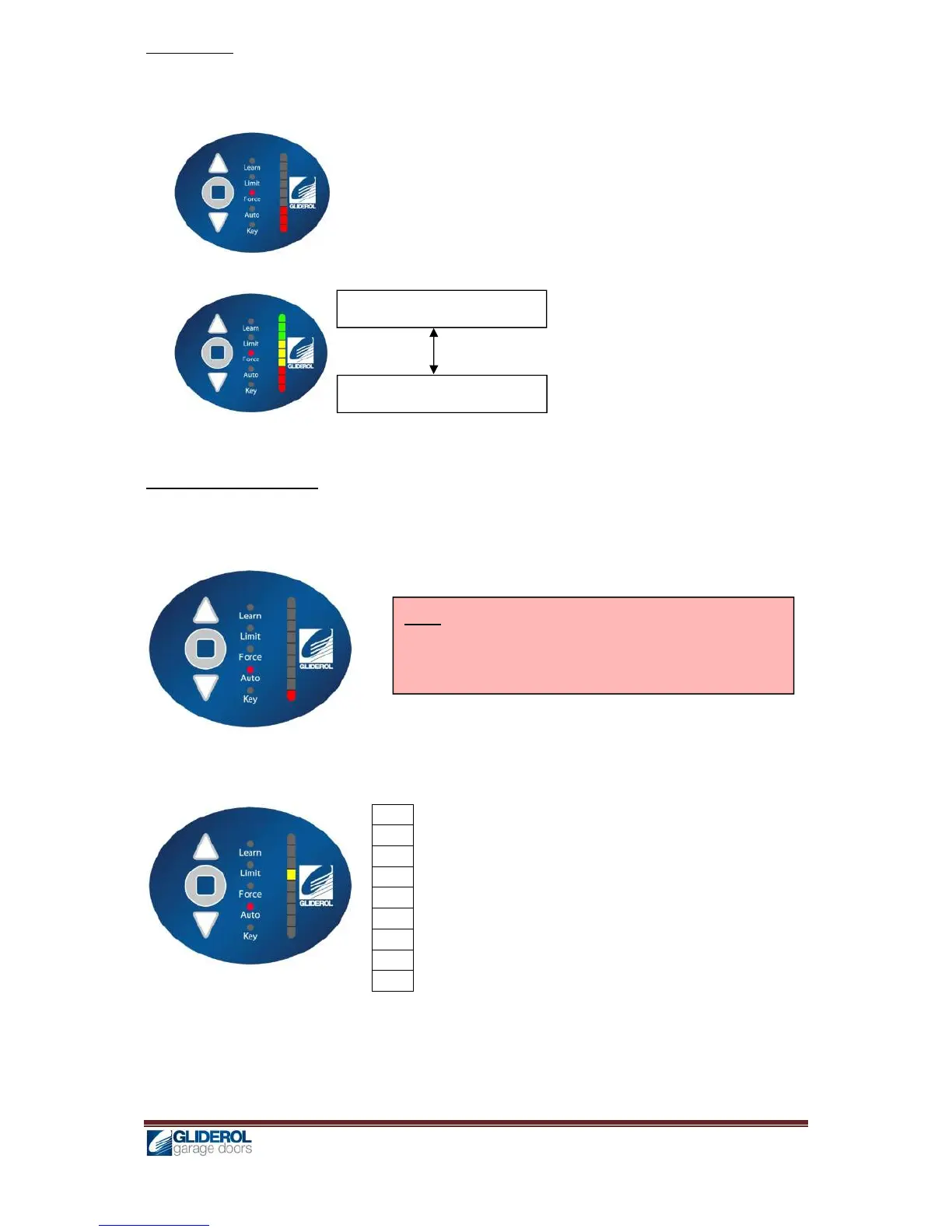
Force Setting
1. Press and hold [ENTER] for 2 seconds to enter menu selection
2. Using [UP] and [DOWN] to select Force option, and press [ENTER]
3. [INDICATOR] will lit to show current force configuration
4. Using [UP] and [DOWN], to adjust the force in the below manner
6. Press [ENTER] to confirm selection, and a beep will signal for successful setup.
Automatic Closing Setting
1. Press and hold [ENTER] for 2 seconds to enter menu selection
2. Using [UP] and [DOWN] to select Auto option, and press [ENTER]
3. [INDICATOR] will lit to show current configuration
4. Using [UP] and [DOWN], to adjust the automatic closing setting in the below manner
80s
70s
60s
50s
40s
30s
20s
10s
OFF
Above shows a setting for 50s automatic closing
5. Press [ENTER] to confirm selection, and a beep will signal for successful setup.
Increase – Low Sensitivity
Decrease – High Sensitivity
Note: If Auto Close is enabled it is important to fit an
auxiliary safety device like Photo beams to avoid human
entrapment or door accidently hitting any object.


 To Next Page