0020094585_01-08/10-Glow-worm
- 18 -
HOWTOUSEYOURCLIMAPRO
2
RF
6.9.3 Programming cooling
Factorysetting:
Monday to Friday
Nº of time
slot
Start End Activate
1 00:00 08:30 OFF
2 08:30 22:00 ON
3 22:00 00:00 OFF
Saturday
Nº of time
slot
Start End Activate
1 00:00 08:30 OFF
2 08:30 22:00 ON
3 22:00 00:00 OFF
Sunday
Nº of time
slot
Start End Activate
1 00:00 08:30 OFF
2 08:30 22:00 ON
3 22:00 00:00 OFF
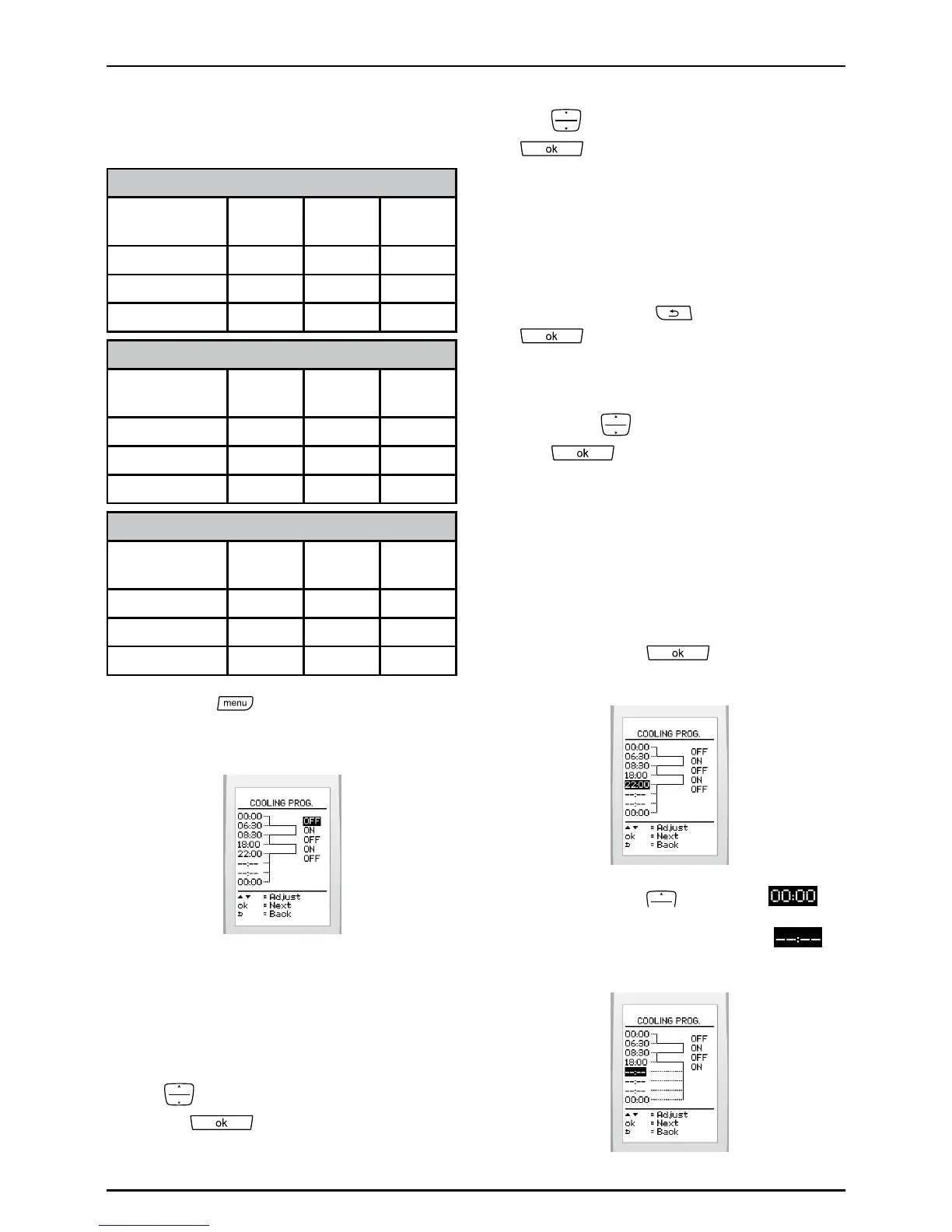
• Pressthe buttonandselect>
cooling>program>dene>choose
a day onthescreen.
Tosetanoperatingtimeslot:
Programmingforadaybeginsat00:00witha
maximumof7timeintervalsover24hours.
• Activateordeactivatethecoolingwith
the
buttonsandvalidatewith
button
.
• Denetheendofthetimeintervalwith
the
buttonsandvalidatewiththe
button.
• Begintheprogrammingoperations
againifyouwishtoaddothertime
intervals.
Tomodifyasetting:
• Usethebuttons
(goback)or
(goforward)tohighlightthe
settinginquestion.
• Changethecoolingsettingoratimeby
pressing
buttonsandvalidatewith
the
button.
Todeleteatimeinterval:
Deletionisperformed:
- timeintervalbytimeinterval,
- fromthelasttimeintervaltotherst.
• Usethebutton
tohighlightthe
lasttimeintervalthatwasset.
• Usethebutton todisplay .
Thedisplayautomaticallygoesto
anddeletestheprogrammedsetting.


 To Next Page