PAGE12 INSTRUCTIONMANUAL TX6150/TX685
MENu
TheMenukeyisusedtosetthevariousfeaturesettings.Thefollowingchartshowstheorderof
theseselections.
1. Duplex(channels1–8and41–48only)
2. CTCSSandDCSCodeSelection
3. TransmitterPower
4. ScramblerSetting
5. VOXSettings
6. SquelchLevelSetting
7. RogerBeepSetting
8. ButtonBeepSelection
9. CallAlarmSelection
10.DualWatchChannel
Using the Menu
ToaccesstheMenu,pressandholdtheMENUkeyuntiltheradiobeeps.Menuoptionswillappear
intheorderlistedabove.
NOTE: The Duplexmenuoptionwillonlyappearwhenchannels1–8 or 41–48areselected.
CTCSS/DCSandtransmitpowersettingsareinhibitedonchannels5/35(emergencychannel).
TosteptothenextMenuitempresstheMENUkeyagain.Tochangetheoptionsintheselected
Menupressthe
or keys.TostoreyourselectionandexittheMenupressthePTT.
Duplex Mode Selection
TheDuplexoptiononlyappearsintheMenuifarepeaterchannel(1–8or41–48)wasselected
priortoenteringthemenu.Toenableduplexontheselectedrepeaterchannel;
1.Selecttherequiredrepeaterchannel1–8or41–48usingthe
or keys.
2.PressandholdtheMENUkeyuntiltheradiobeeps.The
iconwillash.
3.Pressthe
or keystotoggle‘on’(duplexenabled)or‘oF’(duplexdisabled)onthedisplay.
4.PressthePTTtostoreyoursettingandexittheMenu.
WhenDuplexisenabledonarepeaterchannel,the
iconwillbedisplayedwheneverthat
channelisselected.
CTCSS and DCS Code Selection
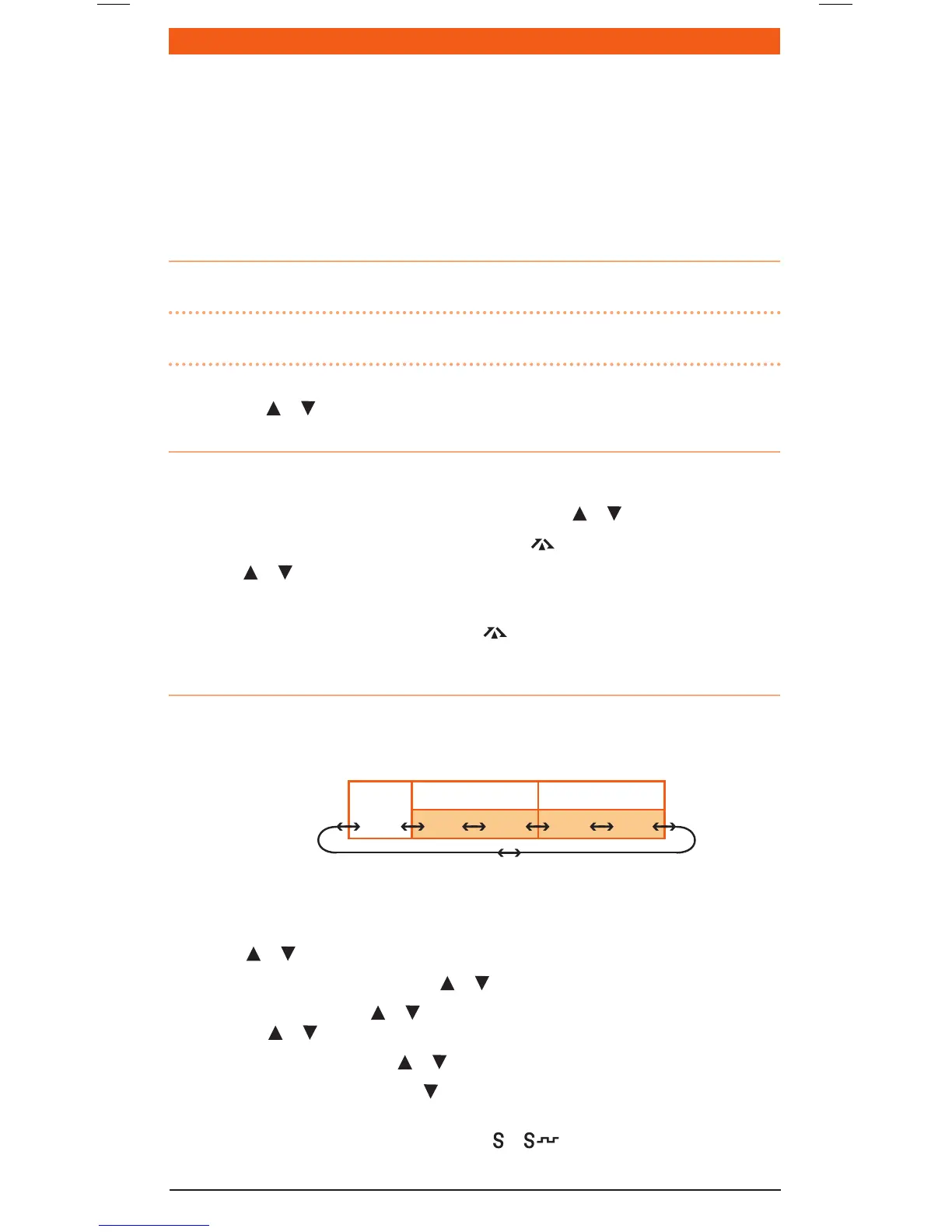
TheradioisttedwithbothCTCSSandDCSsystems.Thereare50CTCSStonesand104DCScodes.
TheDCScodesandtheCTCSStonesareaccessedthroughthesamemenu(seetablebelow).When
CTCSStonesarebeingselected‘CT’isdisplayed.ToaccessDCScodesscrollpastCTCSStone50
until‘DT’isdisplayed.
To Select a CTCSS or DCS Code
1. PressandholdtheMENUkeyuntiltheradiobeeps.‘CT’(forCTCSS)or‘DT’(forDCS)willbe
displayed.
2. Pressthe
or keystoselecttherequiredtone/code.
3. ToselectCTCSStones01to50pressthe
or keyswhile‘CT’isdisplayed.
4. ToselectDCScodes,holdthe
or keytoscrollpasttheCTCSStonesuntil‘DT’isdisplayed.
Nowusethe or keystoselecttherequiredDCScode001to104.
5. ToreturntoCTCSStonesholdthe
or keyuntil‘CT’isdisplayedagain.
6. ToturnCTCSS/DCStonesoff,holdthe
keytosteptotheendofthecodelistuntil‘oF’is
displayed.
7. PressthePTTtoconrmandstoreyourselection.
or isnowdisplayedtoconrmthe
codesystemyouhaveselected.
OFF
CT (CTCSS) DT (DCS)
01 50 001 104



 To Next Page