1616 1717
8. Installation 8. Installation
1.
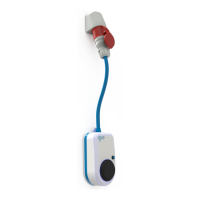
Mount the go-e Charger approx. 1.00 to 1.45 meters
above the ground, depending on your personal fee-
ling of well-being. When determining the optimum
installation position, ensure that there is a proper
distance to the three-phase socket so that the CEE
plug of the charging station can be plugged in easily.
The go-e Charger has to be mounted exactly below
the CEE socket so that little pressure is exerted on
the supply line.
Place the wall bracket in the desired mounting posi-
tion. Use a spirit level to align it straight. Mark the
four drill holes with a pencil by using the wall bracket
as a template.
4X
1 M – 1,45 M
2.
Drill holes at the four marked positions.
4x
3.
Attach the wall bracket with four screws and dowels
each. Drive the dowels into the wall with a hammer.
Make sure that the surface is not warped. The device
may not be attached if the wall bracket is distorted.
Compensate possible unevenness of the wall with
spacers (not included in the scope of delivery).
4X
5.
The go-e Charger is equipped with an integrated DC
protection module with DC detection and additional
AC detection (6 mA DC, 20 mA AC).
On the building side, an RCD type A must be instal-
led and a miniature circuit breaker must be installed
upstream. The local installation regulations must be
observed.
Miniature circuit breakers with characteristic B or C
for 16 or 32 amperes are permissible:
• 3- or 4-pole for three-phase connection
• 2-pole for single-phase connection
4.
Hook the go-e Charger into the wall bracket.
Optional: If required, attach the supplied U-piece di-
rectly above the charger, making it impossible to re-
move the device from the wall bracket. In addition, a
padlock (not included in the scope of delivery) can be
attached.
6.
When installing multiple units, activate static load
balancing via the go-e Charger app (WiFi required).
When using the go-e Controller, you can activate dy-
namic load balancing, which takes into account the
electricity consumption in the entire house.
Installation and operating manual go-e Charger Gemini ex V 1.4Installation and operating manual go-e Charger Gemini ex V 1.4



 To Next Page