37
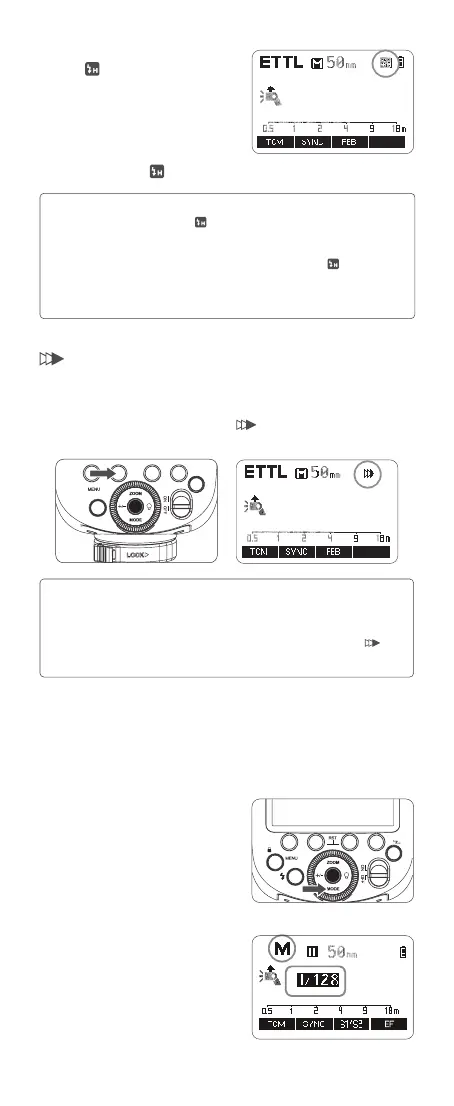
1. Press function button 2<SYNC> so
that the <
> icon is displayed on the
LCD panel.
2. Check whether the < > icon is displayed in the viewnder.
1. If you set a shutter speed that is the same as or slower than the camera’s
maximum flash sync speed, <
> will not be displayed in the viewnder.
2. With high-speed sync, the faster the shutter speed, the shorter the effective flash
range.
3. To return to normal flash, press <SYNC> button again. Then <
> will disappear.
4. Multi flash mode cannot be set in high-speed sync mode.
5. Over-temperature protection may be activated after 10 consecutive high-speed
sync flashes.
Note:
Second-Curtain Sync
With a slow shutter speed and second-curtain sync, you can create a light
train following the subject. The flash res right before the shutter closes.
Press function button 2<SYNC> so that <
> is displayed on the LCD panel.
Flash Mode — M: Manual Flash
The flash output is adjustable from 1/1 full power to 1/256 power with 1/10
increment each step. To obtain a correct flash exposure, use a hand-held
flash meter to determine the required flash output.
1. Press <MODE> mode button so that
<M> is displayed on the LCD panel.
2 Press the <+/-> button to select flash
output amount, then turn the select dial
to adjust it. Press the set button again
to conrm the setting.
1.The second-curtain sync will have better effect in BuLb shooting.
2. The camera flash will re twice in <ETTL> flash mode, the rst of
which is a pre-flash to determine the flash output, not a failure.
3. To return to normal flash, press <SYNC> button again. Then < >
will disappear.
Note:



 To Next Page