43
ETTL: Fully Automatic Wireless Flash Shooting
Using Automatic Wireless Flash with a Single Receiver Unit
1. Transmitter Unit Setting
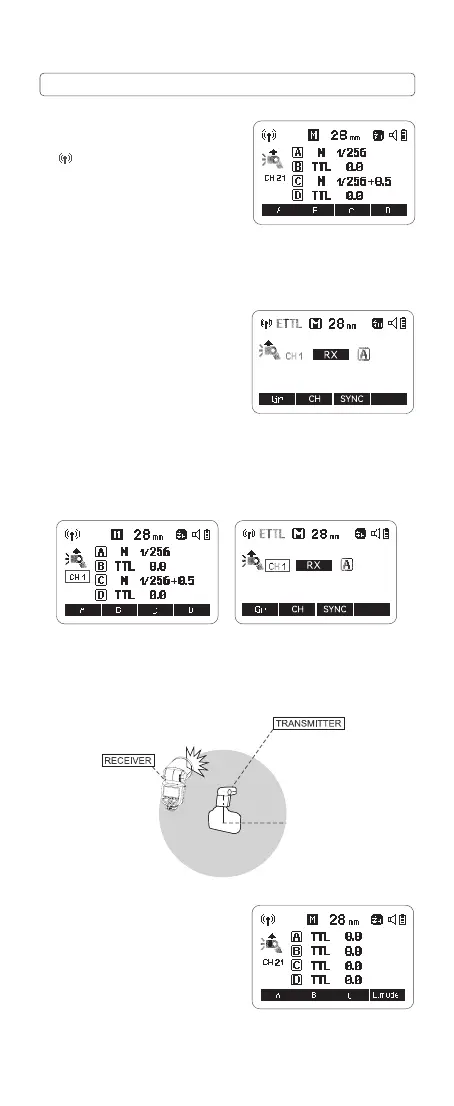
Press the wireless button and the
<
> icon is displayed on the LCD
panel, then the V1Pro C attached to
the camera is set as the transmitter
unit.
X2T-C can also be set as transmitter
unit. X2T-C can control V1Pro C's
ZOOM value when the ZOOM is
adjusted to auto (A) mode.
2. Receiver Unit Setting
Press the wireless button and the
<RX> is displayed on the LCD panel,
then the V1Pro C wirelessly controlled
is set as the receiver unit.
3. Check the Communication Channel
Set the wireless channels of transmitter unit and receiver unit to the same.
For example, if the transmitter unit channel is set to 01, then the receiver
unit channel needs to be 01 as well.
4. Position the Camera and Flashes
The transmission distance of the transmitter unit and receiver unit is
about 100m.
5. Set the Flash Mode to <ETTL>
Press the corresponding function
button 1/2/3/4<A/B/C/D > to make
<
TTL
> is displayed on the LCD panel.
The receiver unit controlled by the
transmitter unit will automatically be
set as <
TTL
>.
Transmission distance
is about 100m
Please set the MENU-TX transmitter unit's flash to ON in order to make the
transmitter unit re flashes.



 To Next Page