35
Flash Mode — E-TTL Auto Flash
In ETTL mode, the camera's metering system detects the flash reflected
from the subject and automatically adjusts the flash output so that
the subject and background are evenly exposed. In this mode, multiple
functions are available: FEC, FEB, FEL, HSS, second curtain sync, etc.
Press < MODE > mode button to enter ETTL mode, the LCD panel will display
<ETTL>.
Press the camera shutter halfway to focus. The aperture value and
effective flash range will be displayed in the LCD panel.
When the shutter is fully pressed, the flash will re a pre-flash that the
camera will use to calculate exposure and flash output the instant before
the photo is taken.
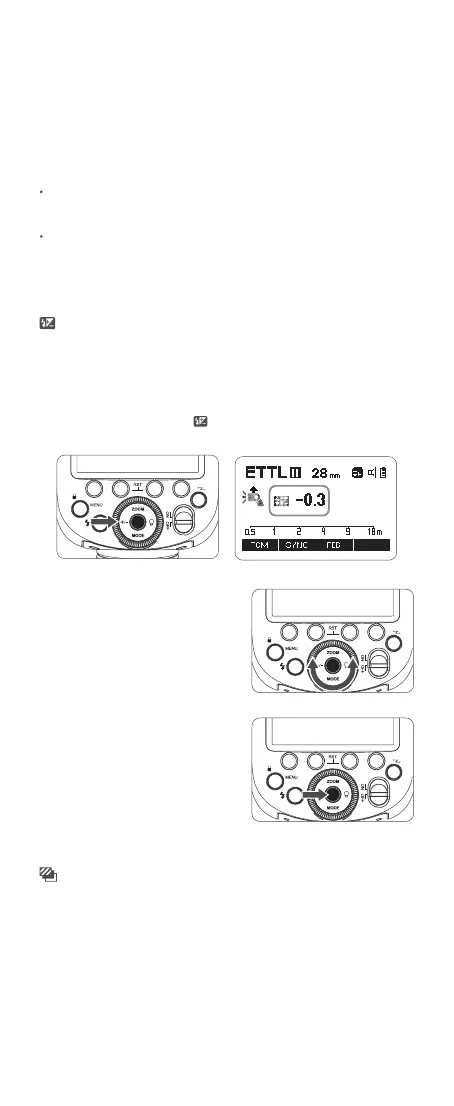
FEC (Flash Exposure Compensation)
With FEC function, this flash can adjust from -3 to +3 with 1/3 increment each
step. It is useful in situations where minor adjustment of the TTL system is
needed based on the environment.
1. Press the <+/-> button, the <
> icon and FEC amount will be highlighted
on the LCD panel.
Setting FEC Amount
2. Turn the select dial to set the
FEC amount.“0.3”means 1/3 step,
“0.7”means 2/3 step.To cancel the
FEC, set the amount to “0”.
3. Press set button again to conrm
the setting.
FEB (Flash Exposure Bracketing)
FEB refers to the flash will automatically change the flash output for each shot
from -3 to +3 with 1/3 increment each step. With this function, the camera
will record three images with different exposures: one exposed according to
camera calculations, one over-exposed and another under-exposed. This
function helps get correct exposure especially in shooting moving objects or
when environmental lights are complex.



 To Next Page