45
3. Set the Wireless Channels of Transmitter Unit and Receiver Unit to the Same
For example, if the transmitter unit channel is set to 01, then the receiver
unit channel needs to be 01 as well.
4. Take Picture
Each receiver unit res at the set flash ratio.
M: Wireless Flash Shooting with Manual Flash
Using wireless (multiple ash) shooting with manual ash, you can shoot
with a dierent ash output setting for each receiver unit (ash group) while
setting all parameters on the transmitter unit.
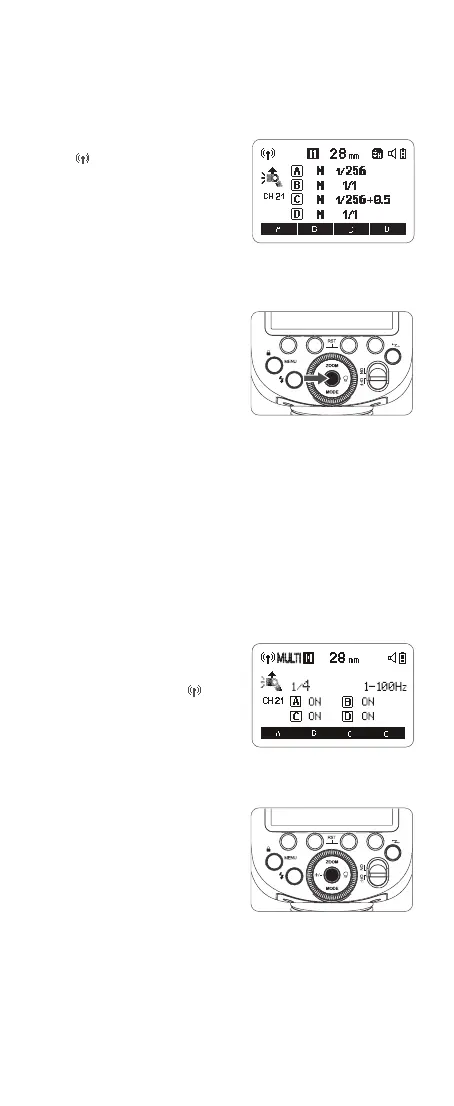
1. Set the Transmitter Unit’s Flash Group to <M>
Press the wireless button and
the <
> icon is displayed on
the LCD panel, then the V1Pro C
attached to the camera is set as
the transmitter unit. Press the
corresponding function button
1/2/3/4<A/B/C/D > to make <M>
is displayed in all the flash groups
on the LCD panel.
2. Set the Flash Output of Each Flash Group
Press function button <A/B/C/D >
to choose a group. Turn the select
dial to set the flash output of the
group, then press the set button to
conrm.
2. Set the Flash Output, Number of Flashes and Flash Frequency of the
Wireless Multi Flash
Press <+/-> button to select flash
output of multi flash. Turn the select
dial to set the flash output amount,
then press the set button to conrm
the settings and exit.Press the set
button to select number of flashes of
flash frequency. Turn the select dial
to set the number of flashes of flash
frequency, then press the set button
to conrm the settings and exit.
3. Turn On/Off the Wireless Multi Flash of Receiver Unit Group
The wireless multi flash of receiver unit A/B/C/D can be turned on or off
directly on the transmitter unit.
Multi: Wireless Flash Shooting with Manual Flash
1. Set the Transmitter Unit to Wireless Multi Flash
Press <MODE> mode button so
that <Multi> is displayed on the
LCD display, then press the wireless
button so that <Multi> and <
> are
displayed on the LCD display at the
same time.



 To Next Page