42
Scan the Spare Channel
You can scan the spare channel to avoid the interference of using the same
channel by others.
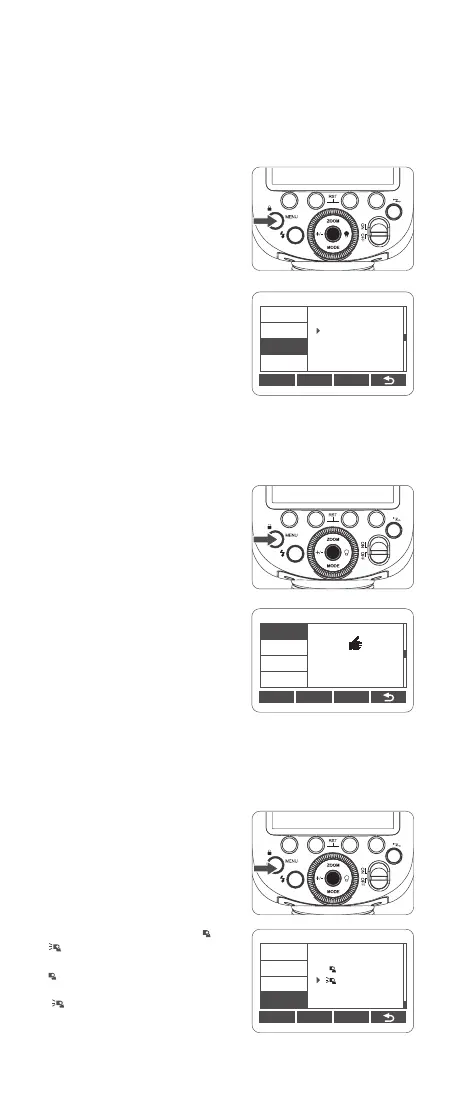
1. Press <MENU> menu button to
enter menu setting. Turn the select
dial to <SCAN>, then press the set
button to choose SCAN.
ID Settings
Change the wireless channels and wireless ID to avoid interference for it can
only be triggered after the wireless channels and IDs of the transmitter unit
and the receiver unit are set to the same. Press the menu button to enter C.Fn
ID, press the set button to choose OFF to turn off the wireless ID, or choose
any gure from 01 to 99.
2. Turn the select dial to adjust wireless
ID from 01 to 99 or OFF. Press the set
button to conrm.
1. Press <
MENU
> menu button to
enter menu setting. Turn the select dial
to <ID>, then press the set button to
choose ID.
C.Fn Ver 0.2
CLEAR
CH
ID
BEEP
STBY
99
SCAN
Transmitter Unit's (Flash) ON/OFF
You can set whether the transmitter unit (flash) that transmits wireless signal
flashes or not, and when the transmitter unit flash setting is on, the flash res
as a flash A group.
2. Turn the select dial to choose
START, then press the set button to
scan. And the 8 spare channels will
be displayed for your choice.
1. Press <MENU> menu button to
enter menu setting. Turn the select
dial to < TX>, then press the set
button to choose TX.
C.Fn Ver 0.2
CLEAR
CH
ID
BEEP
SCAN
22 08 32 23
30 21 07 06
2.Turn the select dial to choose < > or
<
>,Press the set button to conrm.
<
>:The transmitter unit ash ring
is OFF.
<
>:The transmitter unit ash
ring is ON.
Note: Even if the transmitter unit flash ring is off, it still transmits wireless flash signals.
C.Fn Ver 0.2
CLEAR
LCD
FEB ACL
TX
STBYLIGHT



 To Next Page