GR
CH
Setting the Receiver
4. The channel amount will increase from 1 to 32. When the current channel is 32, press the
<CH> Button again and the channel 1 will be displayed on the panel.
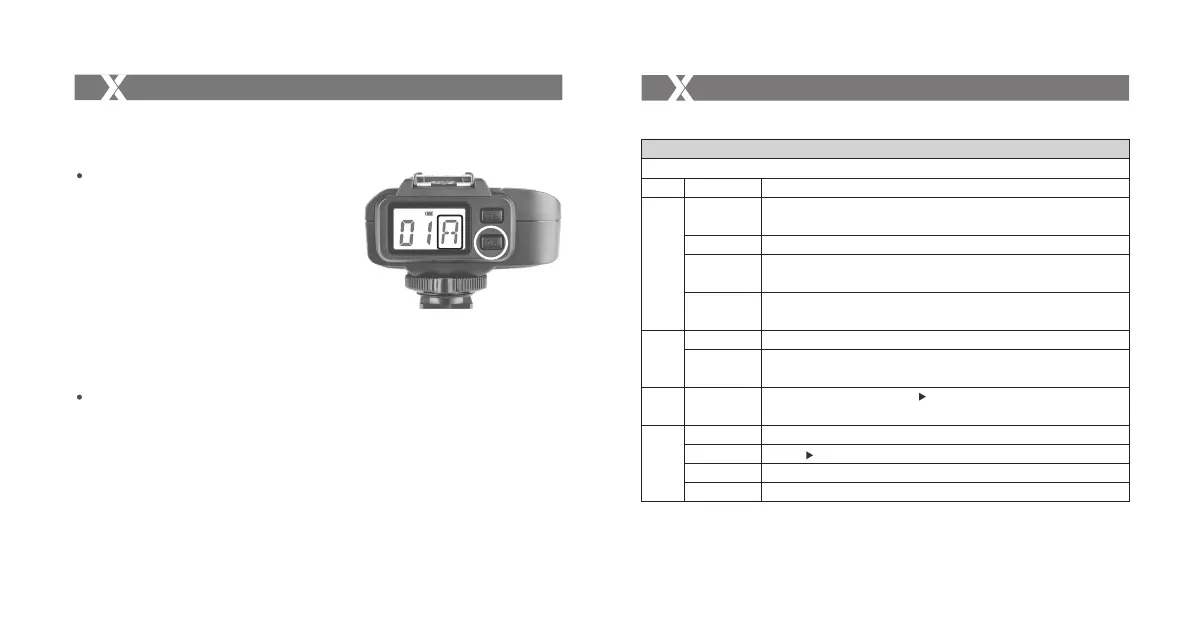
Group Settings
1. Short press the <GR> Button and the group
amount will increase a step each time.
2. Long press the <GR> Button will enter quicker
adjustment mode. The group amount will increase
fast in this mode.
3. Release the <GR> Button and the current group
amount is confirmed.
4. The group amount will increase from A to E. When
the current group is E, press the <GR> Button
again and the group A will be displayed on the
panel.
Automatically Enter Power Saving Mode
1. The system will go into standby mode after the transmitter goes into standby mode. And the
displays on the LCD panel disappear now.
2. To wake up the system, press the <TEST> Button or the <GR> Button. Fully press the
<TEST> Trigger Button of the transmitter can also wake up the receiver’s system. If the
transmitter is attached to the NIKON DSLR camera, half press the camera shutter can also
wake up the system.
Selecting the Operation Method
Button
CH/OK
GR
MODE
Transmitter:
X1N Operation Method 1(by default)
TTL/M Mode
Operation
Short press
Double-click
Long press for
2 seconds
Long press for
5 seconds
Short press
Long press for
2 seconds
Short press
Status
Normal
Set the channel
Set the group
Select
Dial
Function
(under normal status)Enter CH settings; (under settings)Confirm and back to
normal status
Control the ON/OFF of modeling flash
Enter C.Fn custom settings
Switch the Operation Methods (Method 1/Method 2)
Select the POWER/FEC settings
Select all the group
(under normal status) Switch the < Group> mode (TTL/M/OFF)
Function
Set the < Group>
Adjust the channel amount
Adjust the group’s POWER/FEC amount
- 41 - - 42 -



 To Next Page