Unlocking and Turning On System Power
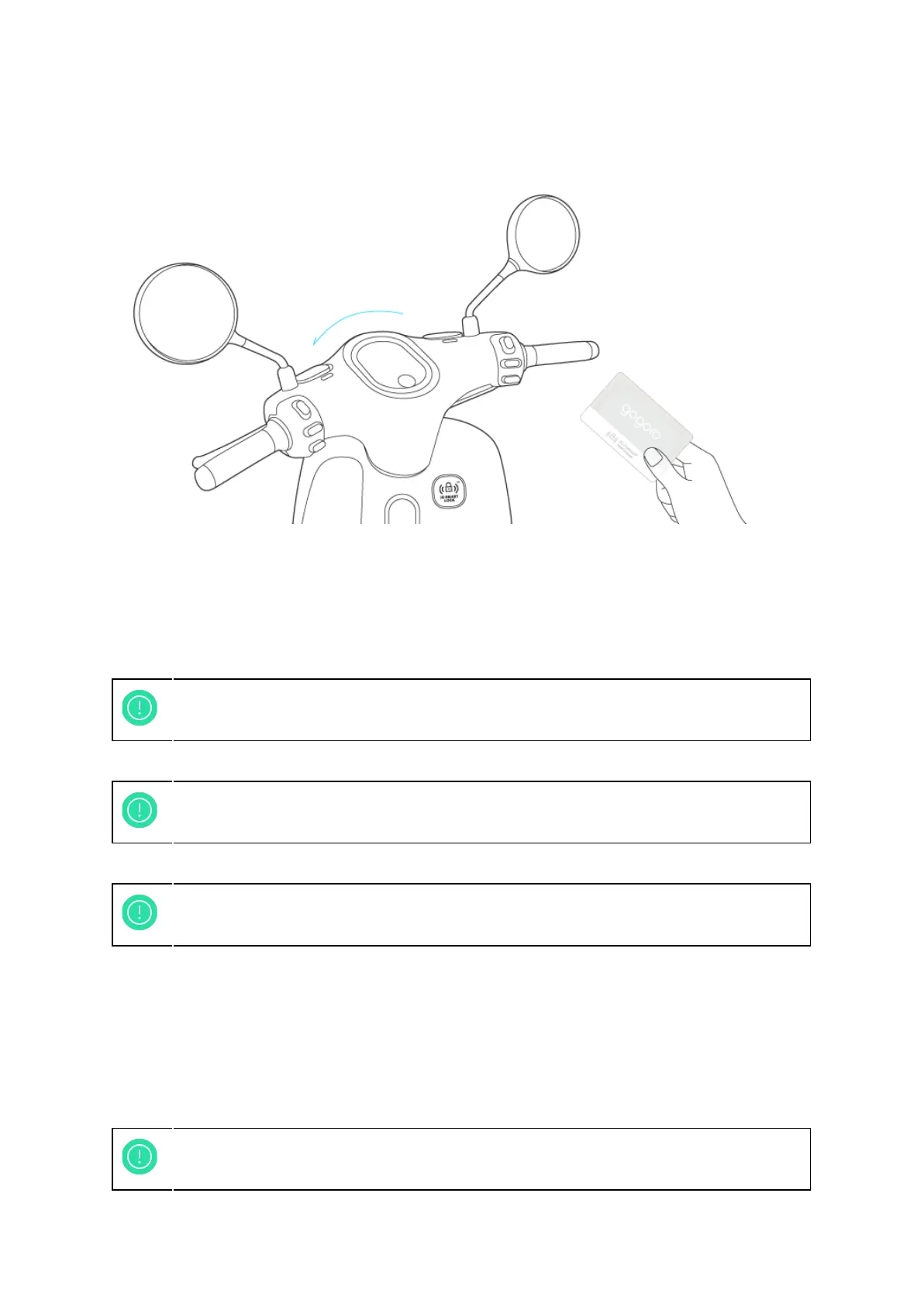
Figure 2-2: Unlock and Lock
● To unlock the Smartscooter®, make sure the handlebar is all the way to the left.
Swipe the iQ System® Smart Keycard near iQ System® sensor to unlock your
Smartscooter®.
● The headlight and tail light will flash, the dashboard light up, with an audible tone.
The handlebar released after the CLICK sound.
Locking
● To lock the Smartscooter®, turn the handlebar all the way to the left end and swipe
the iQ System® Smart Keycard near the iQ System® sensor.
● The headlight and tail light will flash, the dashboard dimed, with an audible tone.
The handlebar locked after the CLICK sound.
11
Please make sure the handlebar is at the left side end when trying to unlock the
Smartscooter®, or the lock might not successfully release.
Make sure the handlebar is released successfully before riding, turn the handle
bar can turn freely from left end to right.
Turn the handlebar all the way to the left end and make sure the handle bar lock
is successfully locked when locking the Smartscooter®.



 To Next Page