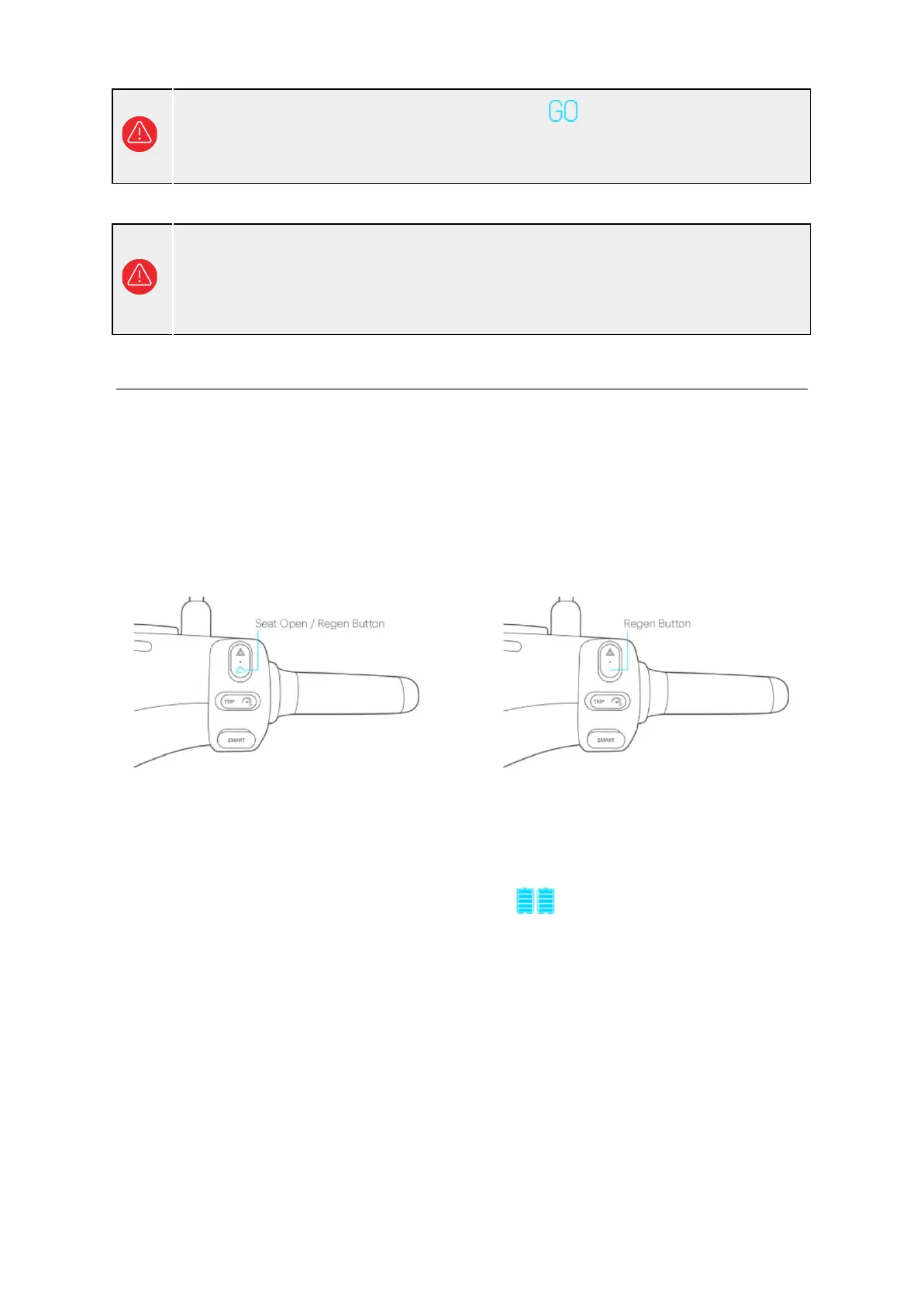
Regenerative Braking
Figure 3-1: Regenerative braking button
Model with iQ System® Smart Key Model with mechanical key
When you release throttle and let the Smartscooter® glide during riding, the regenerative
braking function might be activated. It converts dynamic energy to electric energy, and puts
the energy back into the Gogoro Network™ battery.
● When regenerative braking is activated, the remaining battery power display
on the dashboard will show an animation to inform you that the battery is charging.
● The power recovery rate can be adjusted or turned off through the Gogoro® App.
When regenerative braking is activated, you will feel a braking force on the rear
wheel. The higher the power recovery rate you set, the stronger the braking force.
● The brake light turns on when regenerative braking is activated.
● The system sets the intensity of regenerative braking based on the setting in the
Gogoro® App, but also takes the current speed and remaining battery level into
consideration, and makes minor adjustments accordingly.
● In some instances, e.g. the Gogoro Network™ battery is nearly fully charged,
regenerative braking will not be activated.
16
The scooter can only be started when complete standstill. If the motor shuts off
or loses power accidentally, please glide or push the Smartscooter® to the
roadside slowly and carefully before trying to restart the Smartscooter®. Do not
attempt to restart it while in motion or at the middle of the road.



 To Next Page