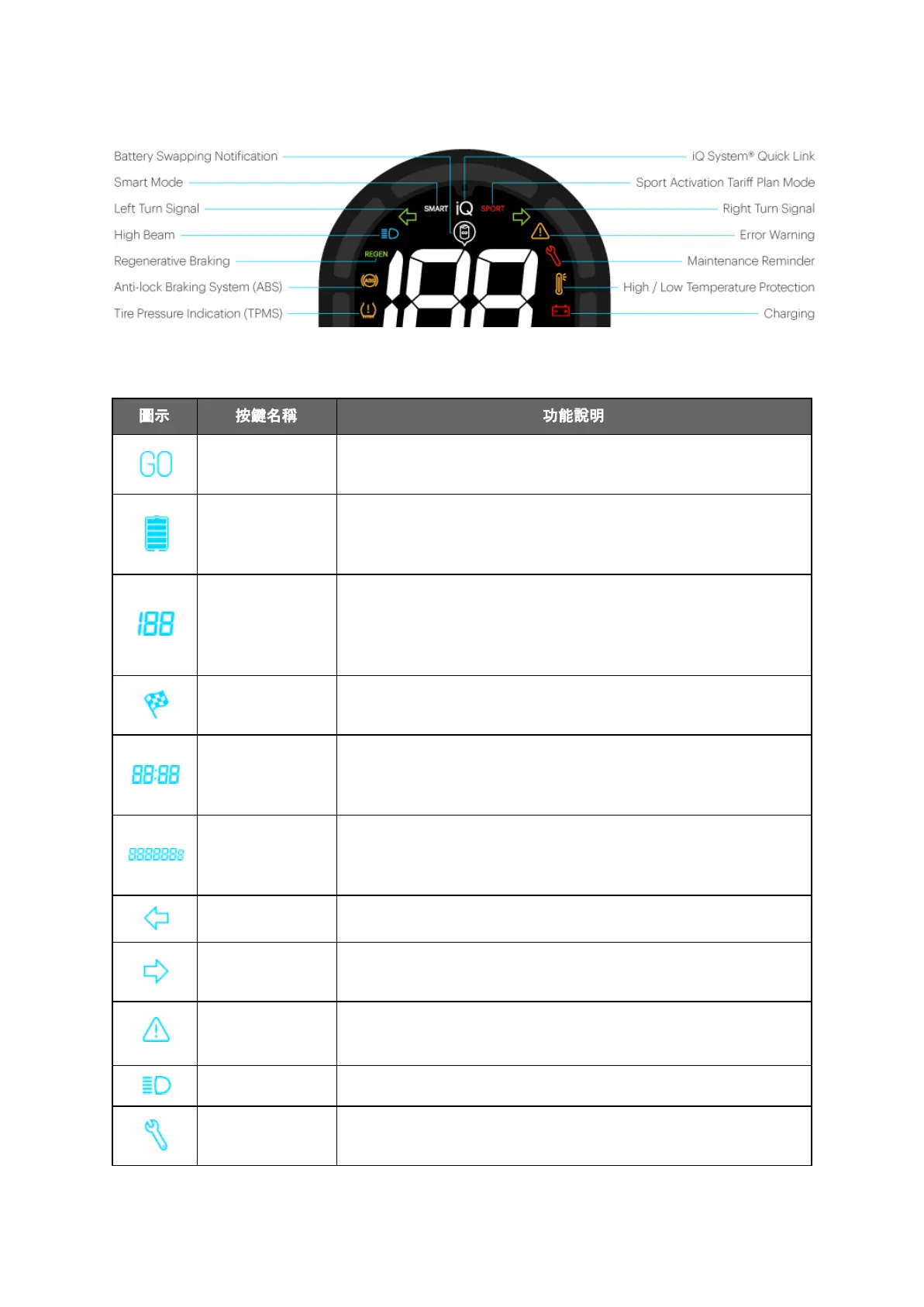
Figure 1-6: Dashboard Icon Name
Table 1-1: Information about dashboard icon
8
Sets the Smartscooter® to motor standby mode or shuts
down the motor.
Remaining
battery power
display
Indicates the current battery level.
Indicates the current moving speed.
No figure is shown with motor off, and “0” is displayed if the
Smartscooter® is in motor standby mode and remains in
full stop.
If the Smartscooter® is in Super Boost Mode, the icon
lights up.
Displays the current time; the time is automatically
calibrated when the owner exchanges batteries at a
GoStation®.
Displays total mileage (ODO), single trip mileage (TRIP) and
estimated remaining mileage for the current charge
(REMAINING).
Blinks in sync with the left turn signal.
Blinks in sync with the right turn signal.
Turns on during operating errors or temporary system
abnormalities.
Lights up along with the high beam.
Informs the owner of any system abnormalities. The owner
should visit a Gogoro designated service center.



 To Next Page