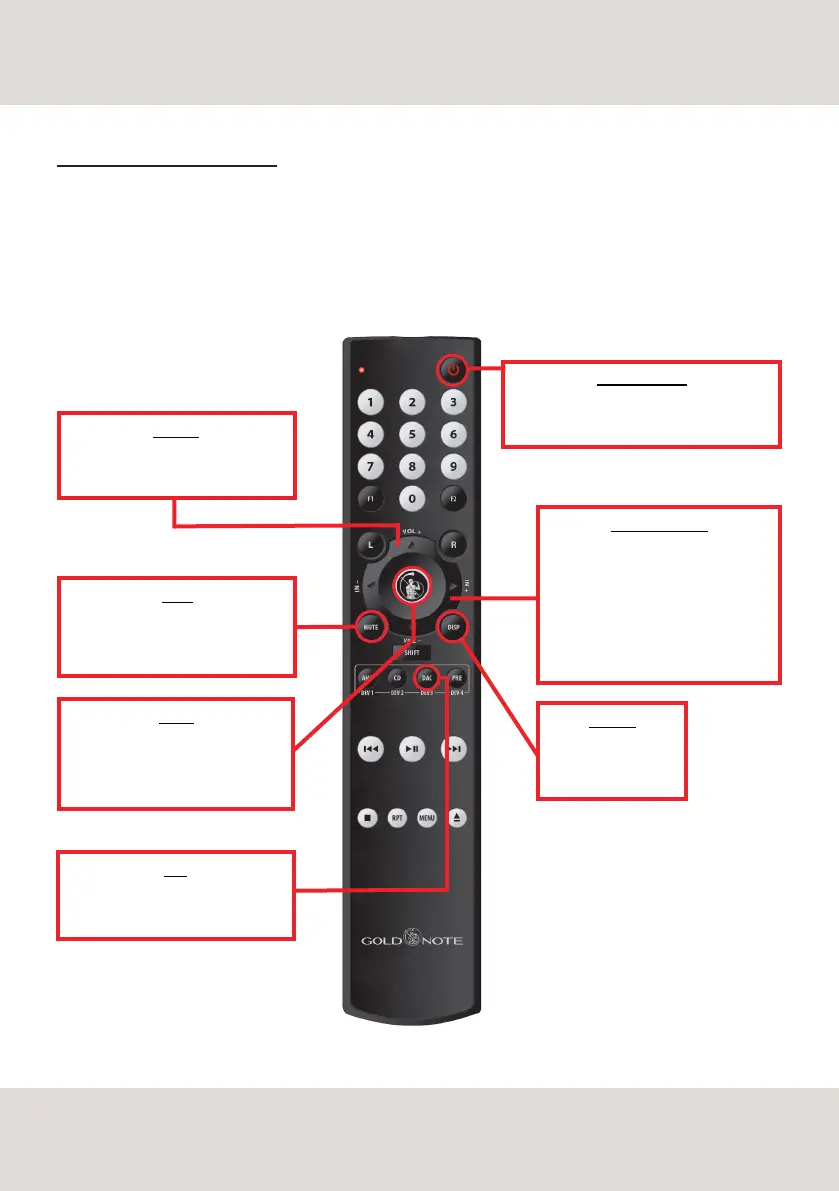
ENTER
activates the SELECTION FRAME
and selects the functions, just like
you would do by pressing the knob
POWER ON/OFF
use POWER ON/OFF to turn ON and OFF
the DS-10 PLUS
DAC
To control DS-10 PLUS press the
button DAC on the remote control
VOLUME
use VOL+ and VOL- to adjust the
volume level by 1 step at a time
MUTE
use MUTE to instantly mute the DS-10
PLUS the input selection is disabled
while DS-10 PLUS is in MUTE
INPUT SELECTION
use IN+ and IN- to change the
selected input.
use IN+ and IN- when the SELECTION
FRAME is red (active selection) to
change the function and set the
desired value
DISPLAY
Dimmer in 4 step:
Full, 50%, 25%, OFF
USING THE REMOTE CONTROL
DS-10 PLUS is supplied with a Gold Note remote control to help you conveniently operate the DAC without
even touching the knob located on the frontal panel.
With the remote control you can fully access every function just like you would when using the knob.
The GN remote control can be used to control more than one unit. To control each unit the correct mode must
be selected on the remote.
10
REMOTE CONTROL



 To Next Page