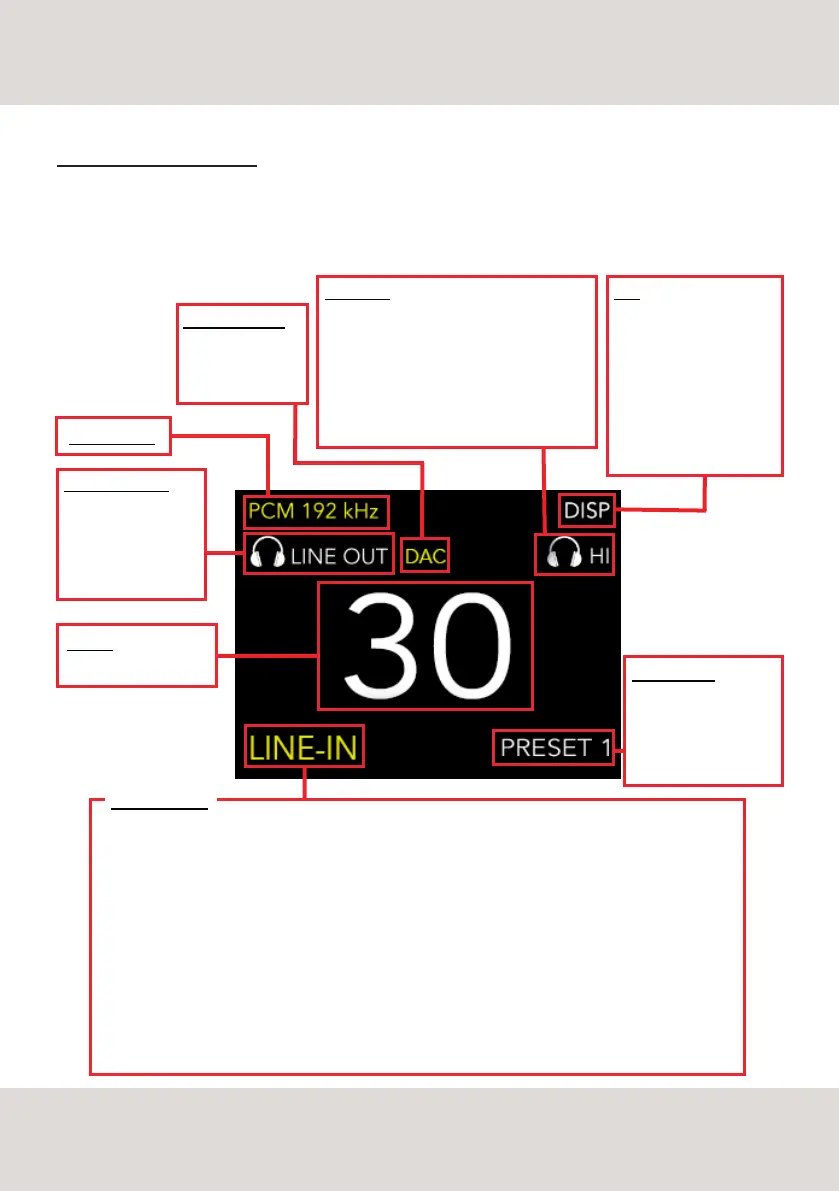
LINE-IN - analog input
NETWORK - select this input to use the streaming services, for music on local servers storage and airplay
AES - balanced input to connect additional sources from your system, like a professional CD Player
USB A type - input to connect additional sources (USB drive)
USB B type - input to connect additional sources (PC/MAC)
TOS 1, 2 - digital inputs to connect additional sources, CD/TV
COAX - digital inputs to connect additional sources, CD/TV
BLUETOOTH - share music from your phone or computer
VOLUME
0 to 100
DISP
Turn the display ON / OFF
/ Dimmer.
When the display is OFF,
simply operate the knob or
the remote to turn it ON
again temporarily (timing
is 3 seconds)
PHONES/LINE OUT
Choose and select one
of the two listening
modes: Headphones
or Line out
AUDIO FORMAT
ENABLE FUNCTION
PRE = volume
DAC = fixed output
MUTE
HIGH - LOW
Browse and select one of the power output
options depending on your Headphones.
The possibility to choose the right
sensitivity allows matching any kind of
Headphones model.
HIGH = 5Watt / LOW = 1Watt
INPUT SELECTION
PRESET 1/2/3
The message showed
on the display when
you select one of the
presets.
FEATURES AND FUNCTIONS
DS-10 PLUS was developed using proprietary technologies and features designed to offer the best
audiophile sound quality but also to achieve ease of use and versatility in order to always deliver a great
performance with a large variety of loudspeakers.
11
OVERVIEW DS-10 PLUS FEATURES



 To Next Page