R L
R L
AES/EBU
COAXUSB HOST USB DAC
GN LINK
AC IN 100 - 240 V
PSU IN
TOS 1 TOS 2
WI-FI
ANTENNA
LINE-IN
WPS
WI-FI
RESET
WI-FI
LED
ETHERNET
UNBALANCED
BALANCED
SERIAL NUMBER
R L
R L
AES/EBU
COAXUSB HOST USB DAC
GN LINK
AC IN 100 - 240 V
PSU IN
TOS 1 TOS 2
WI-FI
ANTENNA
LINE-IN
WPS
WI-FI
RESET
WI-FI
LED
ETHERNET
UNBALANCED
BALANCED
SERIAL NUMBER
WLAN CONNECTION
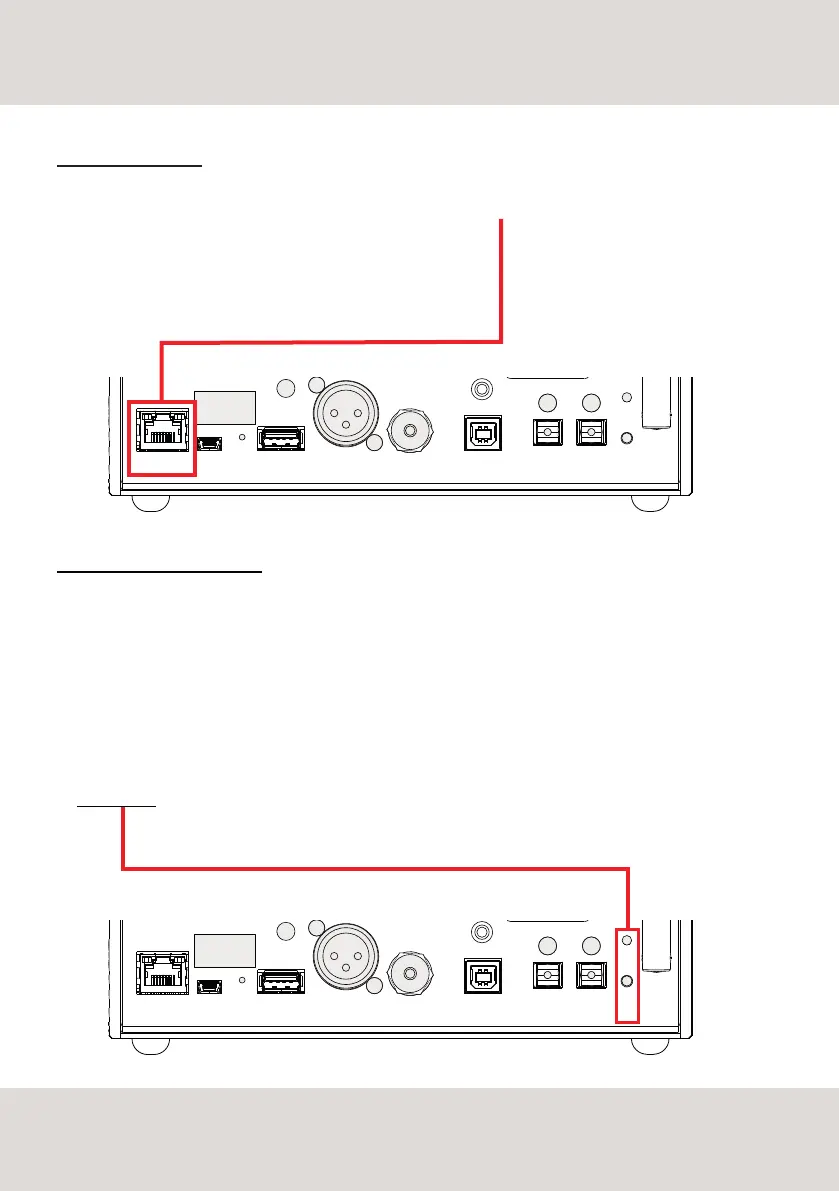
DS-10 PLUS supports both Wired LAN and Wi-Fi connection.
To use a Wired LAN connection simply plug the cable into the Ethernet port on the rear panel and you are
ready to go.
WI-FI CONNECTION VIA WPS
The easiest way to connect DS-10 PLUS to your network via Wi-Fi is to use the WPS (Wi-Fi Protected Setup)
function available on DS-10 PLUS and your router:
1- press and hold for about 10 seconds the Wi-Fi Reset button on the rear panel of DS-10 PLUS and
release it when the blue led start flashing fast
2- press the WPS button on your router (please refer to the instruction manual)
3- wait until DS-10 PLUS automatically connect to your network
4- the blue led will turn ON when the DS-10 PLUS is connected and ready
20
NETWORK SETUP



 To Next Page